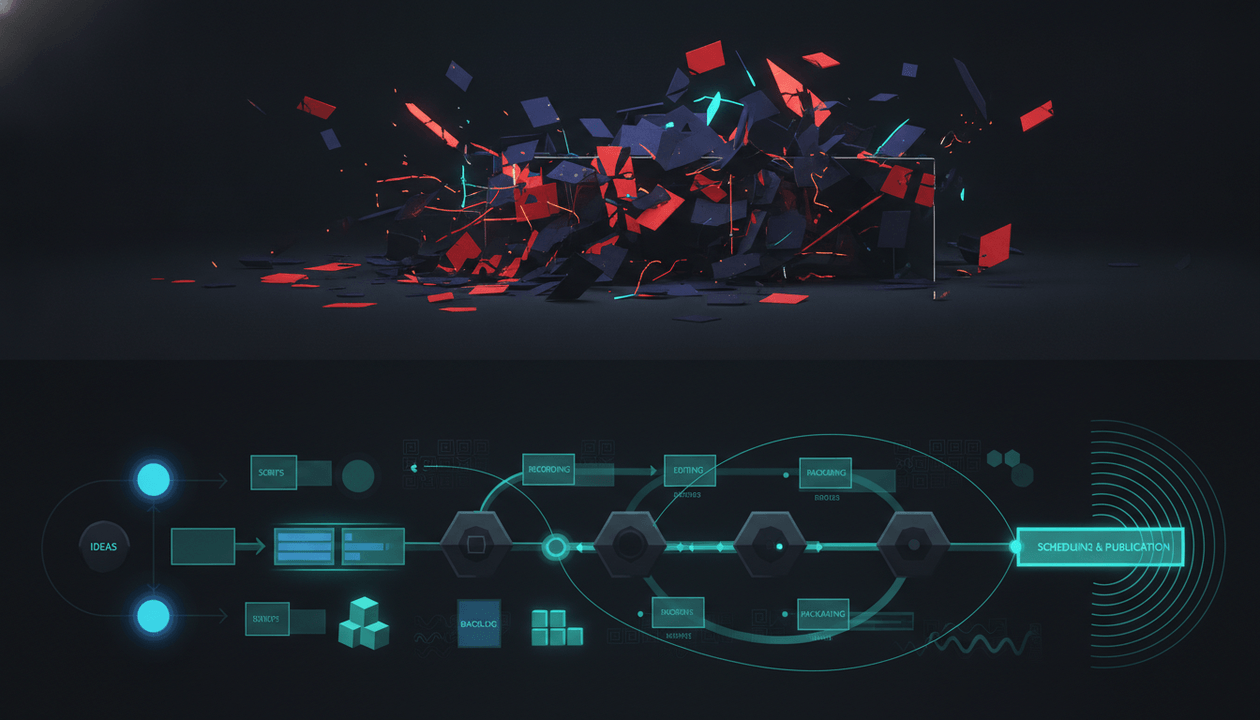
A YouTube content system is not a content calendar.
A content calendar tells you when to publish.
A content system tells you what to publish, why it has a chance, how to package it, how to write it, how to produce it, and how to learn from it after it goes live.
That difference matters.
Most creators do not lose because they lack ideas. They lose because every video starts from zero. They wake up, think of a topic, ask AI for a script, make a thumbnail, publish, then repeat the same random process again next week.
That is not a system.
A real YouTube content system turns your channel into a repeatable machine:
- Find proven topics.
- Validate them with real signals.
- Package them with strong titles and thumbnails.
- Write scripts that match the promise.
- Produce consistently.
- Learn from performance.
- Feed those lessons back into the next video.
The smartest creators do not start from a blank page. They start from patterns that already worked.
Key Takeaways
- A YouTube content system is the repeatable process that turns research into topics, titles, thumbnails, scripts, production, publishing, and feedback.
- The goal is not to create more content. The goal is to create better content with less guessing.
- A strong content system includes research, competitor tracking, trend monitoring, content planning, packaging, scripting, production, publishing, and analytics review.
- YouTube Studio gives creators native signals like audience behavior, analytics, Inspiration ideas, and title/thumbnail testing, but it does not replace a full creator workflow.
- A weak system produces random videos. A strong system compounds learning from every upload.
- OverseerOS is built to help creators create this kind of system by connecting channel analysis, competitor tracking, Smart Content Planners, Overseer Feed, Trend to Script, scripts, titles, thumbnails, and ElevenLabs-powered voiceovers.
- The best YouTube content system is not the most complicated one. It is the one your channel can repeat every week.
What Is a YouTube Content System?
A YouTube content system is a repeatable workflow for creating videos with evidence instead of guesswork.
It answers these questions:
| System Question | What It Solves |
|---|---|
| What should we make? | Topic research |
| Why should this work? | Validation |
| Why would someone click? | Title and thumbnail packaging |
| Why would someone keep watching? | Script and retention structure |
| How do we produce it? | Voiceover, editing, assets, handoff |
| When does it ship? | Planning and scheduling |
| What did we learn? | Analytics and feedback loop |
A content system is bigger than a tool.
It is bigger than a planner.
It is bigger than a script generator.
A proper system connects the whole chain from idea to performance review.
That is important because YouTube rewards more than publishing volume. You need ideas people want, packaging people click, videos people watch, and a feedback loop that makes every next video smarter.
YouTube’s own help docs explain that titles and thumbnails influence whether viewers click, while average view duration helps signal whether viewers find the video interesting. Source: YouTube Help
That means your system has to think about both sides:
- Getting the click.
- Keeping the viewer.
Most creators only focus on one.
YouTube Content System vs YouTube Workflow
These two sound similar, but they are not the same.
| YouTube Workflow | YouTube Content System |
|---|---|
| Tracks tasks | Improves decisions |
| Moves videos through stages | Turns evidence into repeatable output |
| Helps with organization | Helps with strategy, production, and learning |
| Answers “what stage is this in?” | Answers “why are we making this?” |
| Useful for execution | Useful for growth |
A workflow might say:
This video is in editing.
A content system says:
This video came from a competitor breakout, uses a proven title pattern, matches a trend from the last 24 hours, has a thumbnail concept before the script, and will be reviewed against CTR and retention after publishing.
That is much stronger.
The workflow tracks the video.
The system improves the channel.
Why Creators Need a Content System in 2026
YouTube is too competitive for random uploads.
AI made content easier to produce. That means average content is flooding every niche. Generic scripts, generic thumbnails, generic listicles, generic AI voiceovers, generic “top 10” videos.
The way to win is not by producing more generic content.
The way to win is by building a system that makes better decisions before production starts.
A strong YouTube content system helps you avoid:
- Random topic selection.
- Weak titles.
- Thumbnail afterthoughts.
- Generic AI scripts.
- No competitor awareness.
- No trend awareness.
- No production clarity.
- No post-publish learning.
- No repeatable improvement.
The creator with the better system compounds faster.
Every upload teaches them something. Every competitor signal becomes useful. Every outlier becomes a clue. Every trend becomes a possible angle. Every published video feeds the next decision.
That is how a channel becomes strategic.
The 9 Layers of a Strong YouTube Content System
A complete YouTube content system has nine layers.
| Layer | Purpose | Main Question |
|---|---|---|
| Niche intelligence | Understand the market | What is working in this space? |
| Competitor tracking | Watch movement | Who is gaining attention and why? |
| Trend discovery | Catch fresh opportunities | What is happening right now? |
| Topic validation | Avoid weak ideas | Does this idea have evidence? |
| Packaging | Earn the click | What title and thumbnail promise will work? |
| Scripting | Hold attention | How do we deliver the promise? |
| Production | Ship consistently | How do we turn this into a finished video? |
| Publishing | Launch properly | How do we optimize the release? |
| Feedback loop | Improve every cycle | What did the data teach us? |
If one layer is missing, the system gets weaker.
For example:
- Great research with weak packaging means nobody clicks.
- Great thumbnails with weak scripts means viewers leave.
- Great scripts with no production system means output becomes inconsistent.
- Great analytics with no feedback loop means lessons disappear.
- Great AI tools with no research means you create polished garbage.
The system is only as strong as the chain.
Layer 1: Niche Intelligence
Before creating content, you need to understand the market.
Niche intelligence means studying:
- Which channels are growing.
- Which formats are working.
- Which topics keep repeating.
- Which thumbnails dominate the niche.
- Which titles get attention.
- Which videos overperform.
- Which audience pain points show up again and again.
- Which creators are becoming category leaders.
Bad niche research:
I want to make videos about AI because AI is popular.
Better niche intelligence:
In the AI niche, videos about tools are crowded, but workflow breakdowns, agent use cases, creator automation, and “what changed this week” videos are getting stronger traction. The opportunity is to focus on practical creator workflows instead of generic tool lists.
That is a real insight.
A content system starts by knowing the battlefield.
Inside OverseerOS, this connects to channel analysis, Viral Channel Finder, and competitor research. The goal is not to pick topics randomly. The goal is to understand where attention is already moving.
For deeper research strategy, read the best YouTube research tools guide.
Layer 2: Competitor Tracking
Competitor tracking is not copying.
It is market awareness.
You should know:
- What your competitors publish.
- Which of their videos break out.
- Which topics repeat across channels.
- Which thumbnail styles are spreading.
- Which title formulas keep working.
- Which formats are gaining momentum.
- Which smaller channels are outperforming their normal baseline.
The best competitor signal is not always the biggest video.
The best signal is often the video that performs unusually well for that channel.
Example:
| Channel Average | New Video Views | Signal |
|---|---|---|
| 25K views | 30K views | Normal |
| 25K views | 120K views | Interesting |
| 25K views | 400K views | Strong breakout |
| 25K views | 1.2M views | Major outlier |
A 1M-view video from a massive channel may be normal.
A 200K-view video from a small channel may reveal a serious opportunity.
That is why competitor tracking belongs inside your content system.
Use it to find patterns, not to steal work.
For a full breakdown, read the YouTube competitor tracking tools guide.
Layer 3: Trend Discovery
Trends are timing.
A trend can be:
- A breaking news story.
- A new tool launch.
- A platform update.
- A creator controversy.
- A search spike.
- A recurring audience question.
- A new format spreading across a niche.
- A cultural moment.
- A product release.
- A sudden change in viewer behavior.
The mistake is chasing every trend.
A strong content system filters trends.
Ask:
- Is this relevant to our audience?
- Is it fresh?
- Is there YouTube demand?
- Are competitors reacting?
- Is the topic already saturated?
- Can we make a better angle?
- Can we publish before the trend goes cold?
This is where Trend to Script inside OverseerOS becomes powerful.
Instead of only asking “what is trending?”, creators can see fresh web news from the last 24 hours across many categories and move directly into script creation for trending topics.
That matters because trend windows are short.
A creator who sees the trend but needs two days to build the script may arrive late.
A stronger system compresses the distance between:
Trend spotted
and:
Video ready to produce.
For more, read the YouTube trend analysis tools guide.
Layer 4: Topic Validation
A topic should not enter production just because it sounds good.
It needs evidence.
Use this validation checklist:
- The topic fits the channel’s audience.
- The topic has search, trend, or competitor demand.
- Similar videos have performed well.
- There is a clear angle we can own.
- The current videos on the topic are beatable.
- The title and thumbnail can create curiosity.
- The video can be produced at our current quality level.
- The idea has a reason to exist now.
Weak topic:
Best AI tools
Validated topic:
I tested the AI tools creators are using to replace parts of their YouTube workflow, and only a few actually saved time.
The second topic is stronger because it has a point of view.
A content system should force better thinking before production starts.
Layer 5: Packaging
Packaging is the title and thumbnail promise.
This is where many creators lose before the video even starts.
A viewer has not seen your script yet. They have not experienced your editing. They have not heard your voiceover.
They only see the promise.
That promise comes from the title and thumbnail.
Weak packaging:
How to Grow on YouTube
Better packaging:
I Studied 100 Small Channels That Suddenly Broke Out
Weak packaging:
AI Tools for YouTube
Better packaging:
I Rebuilt My YouTube Workflow Using Only AI Tools
Weak packaging:
YouTube Content Strategy
Better packaging:
The Content System I’d Build If I Started YouTube From Zero
Good packaging creates a question the viewer wants answered.
It also gives the script a job.
If the title promises a transformation, the script must show the transformation.
If the thumbnail creates mystery, the script must pay off the mystery.
If the title creates tension, the video must hold that tension.
YouTube now lets eligible creators test up to three different titles and thumbnails in Studio, with the winning option based on watch time. Source: YouTube Help
That makes packaging even more important.
Testing is useful, but it does not replace strategy. You still need strong variants to test.
If thumbnails are a major bottleneck, use the AI YouTube thumbnail generator built from proven thumbnail patterns.
Layer 6: Scripting
A script should not be written from a blank prompt.
A strong script comes from the system.
It should know:
- The topic.
- The viewer.
- The title promise.
- The thumbnail promise.
- The competitor pattern.
- The channel tone.
- The format.
- The hook.
- The emotional driver.
- The retention structure.
- The payoff.
Generic AI prompt:
Write me a YouTube script about productivity.
System-based script prompt:
Write a YouTube script for ambitious creators who feel overwhelmed by too many tools. The title is “The YouTube Content System I’d Build If I Started From Zero.” The video should open with the pain of scattered workflows, then show a step-by-step system for research, competitor tracking, packaging, scripting, production, and feedback. Keep the tone direct, practical, and premium.
The second prompt is better because it carries strategy into writing.
That is what a content system does.
It preserves context.
OverseerOS is built around this idea. Scripts can be created closer to channel strategy, competitor insights, cloned tone, content planning, and trend signals instead of being generated as generic standalone drafts.
Layer 7: Production
Production is where strategy becomes output.
This includes:
- Script finalization.
- Voiceover.
- Visual assets.
- B-roll.
- AI images if used.
- Editing.
- Captions.
- Thumbnail finalization.
- Review.
- Upload prep.
A content system should make production predictable.
That means every video should have a clear status:
| Stage | Status |
|---|---|
| Idea | Approved or rejected |
| Research | Complete or needs validation |
| Title | Drafted or final |
| Thumbnail | Concept, draft, or final |
| Script | Draft, review, or final |
| Voiceover | Needed, generated, or approved |
| Edit | Assigned, in progress, or complete |
| Review | Needs changes or approved |
| Upload | Scheduled or published |
This is where creators often need a planner.
A planner should not just store random ideas. It should connect to the system.
Inside OverseerOS, Smart Content Planners let creators organize topics, scripts, and voiceovers while keeping the planning process tied to channel research and competitor signals.
For a deeper planning breakdown, read the best AI YouTube content planner tools guide.
Layer 8: Publishing
Publishing is not just uploading.
A strong publishing system includes:
- Final title.
- Final thumbnail.
- Description.
- Tags if relevant.
- Playlist placement.
- End screen.
- Pinned comment.
- Chapters if useful.
- First comment strategy.
- Community post support if relevant.
- Title/thumbnail testing where available.
- Launch timing.
- Internal team review.
The goal is not to overcomplicate publishing.
The goal is to avoid sloppy launches.
A strong video can underperform if the final title is rushed, the thumbnail is unclear, or the upload checklist is incomplete.
A content system makes the final step boring.
That is good.
Boring means repeatable.
Layer 9: Feedback Loop
This is the layer most creators skip.
They publish, check views, feel good or bad, then move on.
That is not analysis.
A real feedback loop asks:
- Did the video get impressions?
- Did people click?
- Did the title and thumbnail create the right expectation?
- Did retention drop early?
- Did the intro deliver fast enough?
- Did viewers comment with follow-up questions?
- Did the topic outperform the channel baseline?
- Did the format work?
- Should this become a series?
- What should we test next?
YouTube Studio’s Audience tab can show what your viewers watch outside your channel, including patterns in the videos and channels your audience engages with. YouTube suggests paying attention to themes in those videos’ thumbnails and titles. Source: YouTube Help
That is exactly the kind of signal a content system should feed back into future planning.
Do not just measure views.
Learn why the video performed the way it did.
The YouTube Content System Blueprint
Here is the full blueprint.
| Stage | Goal | Output |
|---|---|---|
| Market research | Understand what is working | Niche notes, competitor list, pattern library |
| Competitor tracking | Spot movement | Breakout videos, title patterns, thumbnail patterns |
| Trend discovery | Find timely opportunities | Fresh topic candidates |
| Topic validation | Choose only strong ideas | Approved topic list |
| Packaging | Make the idea clickable | Title, thumbnail concept, hook |
| Scriptwriting | Deliver the promise | Final script |
| Voiceover | Prepare narration | Voiceover file |
| Production | Create the video | Edited video and thumbnail |
| Publishing | Launch cleanly | Optimized upload |
| Feedback | Learn and improve | Next content decisions |
This is what most creators are missing.
They have pieces.
They do not have the full loop.
How OverseerOS Helps Build a YouTube Content System
OverseerOS fits naturally as the strategy and pre-production layer of a YouTube content system.
It helps creators move from research to execution without starting from zero every time.
Here is how the pieces connect.
Research the Market
Use channel analysis and Viral Channel Finder to study what is working in your niche.
Instead of guessing which channels matter, you can analyze channels, look for patterns, and understand which content formats are gaining traction.
Track Competitors
Add competitors to Smart Content Planners and keep them inside your workflow.
This helps you monitor what similar channels are publishing, find winning topics, and study competitor movement instead of checking channels manually every time.
Watch Fresh Trends
Use Trend to Script to find fresh web news from the last 24 hours across many categories.
This is especially useful for fast-moving niches like AI, tech, sports, finance, creator economy, gaming, business, and news commentary.
Plan Content
Use Smart Content Planners to organize topics, scripts, and voiceovers.
This turns scattered ideas into a real production pipeline.
Build Better Titles and Thumbnails
OverseerOS helps creators work from proven YouTube patterns instead of blank-page guessing.
For thumbnails, creators can generate from scratch, clone style from a YouTube URL, clone from analyzed channel style, or use a 1M+ view thumbnail style library.
Write Scripts From Strategy
Scripts can be created based on channel tone, topic angle, and proven content structure.
This helps avoid generic AI scripts that sound clean but fail as YouTube videos.
Generate Voiceovers
OverseerOS includes ElevenLabs-powered voiceover generation inside the workflow, reducing the need to jump into separate tools just to turn scripts into narration.
Keep the System Moving
The point is not just to create one video.
The point is to create a repeatable system where research, planning, scripts, thumbnails, and voiceovers stay connected.
Example: Building a Content System for an AI Channel
Let’s say you run a faceless AI channel.
Weak approach:
- Ask AI for video ideas.
- Pick “Top 10 AI Tools.”
- Generate a script.
- Make a generic thumbnail.
- Publish.
- Repeat.
System approach:
- Track AI channels in your niche.
- Find which topics are breaking out.
- Use Trend to Script to see fresh AI news from the last 24 hours.
- Choose a topic with strong timing and audience demand.
- Study the title and thumbnail patterns of recent winners.
- Create a stronger angle.
- Write a script around the viewer’s pain.
- Generate a voiceover.
- Move the video through a planner.
- Review CTR, retention, and comments after publishing.
Example topic:
A new AI agent tool launches.
Weak title:
New AI Agent Tool Explained
System-based title:
This AI Agent Could Replace Half Your Creator Workflow
Thumbnail concept:
One creator surrounded by messy tools on one side, one clean AI agent workflow on the other.
Script hook:
The interesting part about this new AI agent is not that it can automate tasks. The interesting part is what it makes unnecessary. If this works the way creators hope, it could replace half the messy workflow people currently use to research, write, and produce videos.
That is stronger because it is not just news.
It is a story with stakes.
Example: Building a Content System for a Psychology Channel
Weak approach:
Make another video called “Signs Someone Likes You.”
System approach:
- Track psychology and relationship channels.
- Find repeated breakout themes.
- Notice videos about emotional distance outperforming generic attraction videos.
- Read comments and identify viewer pain.
- Create a deeper angle.
- Build title and thumbnail around emotional tension.
- Script around story, not advice.
Example title:
The Moment Someone Emotionally Leaves Before They Physically Leave
Why it works:
- It has emotional tension.
- It feels specific.
- It creates curiosity.
- It promises a deeper explanation.
- It fits the niche.
A content system helps you find the deeper version of a topic.
Example: Building a Content System for a Business Channel
Weak approach:
Make “5 Business Lessons From Successful Entrepreneurs.”
System approach:
- Track business case study channels.
- Find outlier videos about failed startups.
- Notice viewers respond to high-stakes collapse stories.
- Pick one company with a strong story arc.
- Package the video around one fatal decision.
- Script it like a mini-documentary.
Example title:
The Billion-Dollar Company That Collapsed From One Bad Bet
Why it works:
- Clear stakes.
- Built-in curiosity.
- Strong story structure.
- Easy thumbnail concept.
- Strong retention potential.
The system does not just find a topic.
It finds the angle.
The YouTube Content System Template
Use this for every video.
1. Content Opportunity
Topic:
Source of idea:
Competitor signal:
Trend signal:
Search signal:
Audience pain:
Why now:
2. Validation
- This topic fits our audience.
- Similar topics are working.
- There is a clear original angle.
- The current market has a gap.
- We can produce this at a high enough level.
- The topic is not already overdone.
- The idea can become a strong title and thumbnail.
3. Packaging
Working title:
Backup title:
Thumbnail concept:
Main curiosity gap:
Emotional trigger:
Viewer promise:
4. Script Strategy
Opening line:
Main story/question:
Key sections:
Examples needed:
Pattern interrupts:
Payoff:
Ending:
5. Production
Voiceover:
Visual assets:
B-roll:
Editor:
Thumbnail designer:
Review deadline:
Publish date:
6. Publishing
Final title:
Final thumbnail:
Description:
Pinned comment:
Playlist:
End screen:
Test variants:
7. Feedback
CTR:
Average view duration:
Retention drop-off:
Traffic source:
Comments:
What worked:
What failed:
Next video idea:
Common Mistakes When Building a YouTube Content System
Mistake 1: Confusing a Calendar With a System
A calendar is useful, but it does not make your ideas better.
A calendar can tell you:
Publish on Tuesday.
A system tells you:
This topic should be published because three competitors broke out with similar angles, the trend is fresh, and we have a stronger title and thumbnail concept.
Do not mistake scheduling for strategy.
Mistake 2: Starting Every Video From Scratch
If every video starts with:
What should I make today?
your system is broken.
Your next video should come from:
- Competitor signals.
- Trend signals.
- Audience questions.
- Previous video performance.
- Search demand.
- Outlier patterns.
- Planned series.
- Channel strategy.
A content system creates a pipeline of validated ideas.
Mistake 3: Using AI Without Evidence
AI can speed up your workflow, but it cannot magically know what your niche wants unless you feed it the right context.
Bad:
Write me 10 viral video ideas.
Better:
Based on these competitor outliers, this audience pain, and this channel tone, generate 10 original video angles.
AI is strongest when it executes a researched strategy.
Mistake 4: Treating Thumbnails as Decoration
A thumbnail is not a design asset.
It is a click decision.
Your system should create thumbnail concepts before the script is finished, not after the video is done.
Ask:
- What is the visual tension?
- What is the focal point?
- What does the viewer understand in one second?
- Does the thumbnail support the title?
- Does it create curiosity without misleading?
Mistake 5: Copying Competitors Instead of Modeling Patterns
Competitor research should never become lazy copying.
Do not copy:
- Scripts.
- Thumbnails.
- Titles.
- Branding.
- Channel identity.
- Story structure word for word.
Do study:
- Topic demand.
- Format.
- Title pattern.
- Thumbnail principle.
- Viewer emotion.
- Content gap.
- Timing.
- Comment demand.
YouTube’s impersonation policy says content intended to impersonate a person or channel is not allowed. Source: YouTube Help
The smart move is to model what works, then create your own original version.
Mistake 6: Publishing Without a Feedback Loop
Views alone are not enough.
After every video, ask:
- Did the idea work?
- Did the packaging work?
- Did the intro work?
- Did viewers stay?
- Did comments reveal a follow-up?
- Should this become a series?
- Should we avoid this format?
- What did this teach us about the audience?
If you do not review, you do not compound.
Mistake 7: Making the System Too Complicated
A system should make production easier, not heavier.
If your system has too many steps, your team will ignore it.
Start simple:
- Research.
- Validate.
- Package.
- Script.
- Produce.
- Publish.
- Review.
Then improve each layer.
The Simple Weekly YouTube Content System
Here is a clean weekly rhythm.
Monday: Research
Review:
- Competitors.
- Trends.
- Outliers.
- Comments.
- Search demand.
- Previous performance.
Output:
- 5 to 10 candidate ideas.
Tuesday: Validate
Score each idea.
| Factor | Score |
|---|---|
| Audience fit | 1 to 5 |
| Competitor signal | 1 to 5 |
| Trend signal | 1 to 5 |
| Packaging potential | 1 to 5 |
| Production difficulty | 1 to 5 |
| Original angle | 1 to 5 |
Pick the strongest idea.
Wednesday: Package
Create:
- 3 title options.
- 2 thumbnail concepts.
- 1 main hook.
- 1 viewer promise.
Do not write the full script until the packaging is clear.
Thursday: Script
Write the script around the promise.
Make sure:
- The first line creates tension.
- The intro pays off the title.
- Every section moves the video forward.
- The ending gives a clear takeaway.
Friday: Produce
Prepare:
- Voiceover.
- Thumbnail.
- Editing notes.
- Assets.
- Upload checklist.
Weekend: Publish or Review
Depending on your schedule:
- Publish the video.
- Review analytics.
- Add lessons to the next research cycle.
This is simple enough to repeat.
That is the point.
The YouTube Content System Scorecard
Use this to audit your channel.
| Question | Yes/No |
|---|---|
| Do you have a repeatable way to find video ideas? | |
| Do you track competitors weekly? | |
| Do you monitor fresh trends in your niche? | |
| Do you validate topics before scripting? | |
| Do you create title and thumbnail concepts before writing? | |
| Do your scripts deliver the exact packaging promise? | |
| Do you have a production pipeline for every video? | |
| Do you know which stage each video is in? | |
| Do you review performance after publishing? | |
| Do you turn analytics into future content decisions? |
If you answer “no” to most of these, you do not have a content system yet.
You have a content habit.
That is not enough if you want serious growth.
What to Look For in a YouTube Content System Tool
A good YouTube content system tool should help with more than task management.
Look for:
- Channel research.
- Competitor tracking.
- Trend discovery.
- Topic validation.
- Outlier discovery.
- Title generation based on patterns.
- Thumbnail strategy.
- Script generation.
- Voiceover workflow.
- Content planning.
- Production status.
- Feedback loop.
- Reduced context switching.
- A repeatable process.
The best tool is not the one that does everything randomly.
The best tool is the one that connects the decisions that matter.
That is why OverseerOS is positioned as a strong YouTube content system for creators who want research, planning, scripts, thumbnails, and voiceovers connected in one workflow.
Final Verdict
A YouTube content system is how you stop guessing.
It turns random uploads into a repeatable process.
It helps you find better topics, validate ideas, package videos properly, write stronger scripts, produce consistently, and learn from every upload.
The weak creator workflow is:
Think of an idea, make a video, hope it works.
The strong creator system is:
Study what is working, validate the opportunity, package it clearly, write from strategy, produce consistently, publish cleanly, review performance, and feed the lesson back into the next video.
That is how channels compound.
If your current process is scattered across random tabs, documents, AI chats, design tools, and spreadsheets, the problem is not that you need more tools.
You need a system.
Use OverseerOS to build a YouTube content system for research, scripts, thumbnails, voiceovers, and planning, then pair it with your editing stack to move from strategy to production without starting from zero every time.
FAQ
What is a YouTube content system?
A YouTube content system is a repeatable process for finding video ideas, validating them, creating titles and thumbnails, writing scripts, producing videos, publishing, and learning from performance. It helps creators create with evidence instead of guessing.
Is a YouTube content system the same as a content calendar?
No. A content calendar tells you when to publish. A content system tells you what to publish, why it should work, how to package it, how to produce it, and how to improve after publishing.
What should a YouTube content system include?
A strong YouTube content system should include niche research, competitor tracking, trend discovery, topic validation, title and thumbnail packaging, scripting, production planning, publishing checklists, and analytics review.
How do I build a YouTube content system?
Start by creating a repeatable weekly process: research topics, track competitors, identify trends, validate ideas, build title and thumbnail concepts, write scripts, produce videos, publish, and review performance. Keep the process simple enough to repeat every week.
What is the best tool for building a YouTube content system?
OverseerOS is a strong fit for creators who want a YouTube content system because it connects channel analysis, competitor tracking, Smart Content Planners, Overseer Feed, Trend to Script, scripts, titles, thumbnails, and ElevenLabs-powered voiceovers.
Can I build a YouTube content system with Notion or Trello?
Yes, you can use Notion or Trello to organize tasks and production stages. But they do not provide YouTube-native research, competitor tracking, trend discovery, title patterns, thumbnail generation, or script generation by default. They are planners, not full YouTube strategy systems.
Why do YouTube creators need a content system?
Creators need a content system because random uploads are hard to scale. A system helps you make better decisions, publish more consistently, avoid weak ideas, and learn from every video.
How often should I update my YouTube content system?
Review your system every month. Check which parts are working, where production slows down, which topics performed best, and what needs to change. Fast-moving niches like AI, finance, gaming, sports, and news may need weekly trend review.
What is the difference between a YouTube workflow and a YouTube content system?
A YouTube workflow tracks production stages. A YouTube content system connects strategy, research, packaging, scripting, production, publishing, and feedback. The workflow moves tasks. The system improves decisions.
Can AI help build a YouTube content system?
Yes, but AI should be used after research. AI is useful for turning validated ideas into titles, scripts, outlines, and production assets. It should not replace competitor research, trend analysis, audience understanding, or strategic judgment.