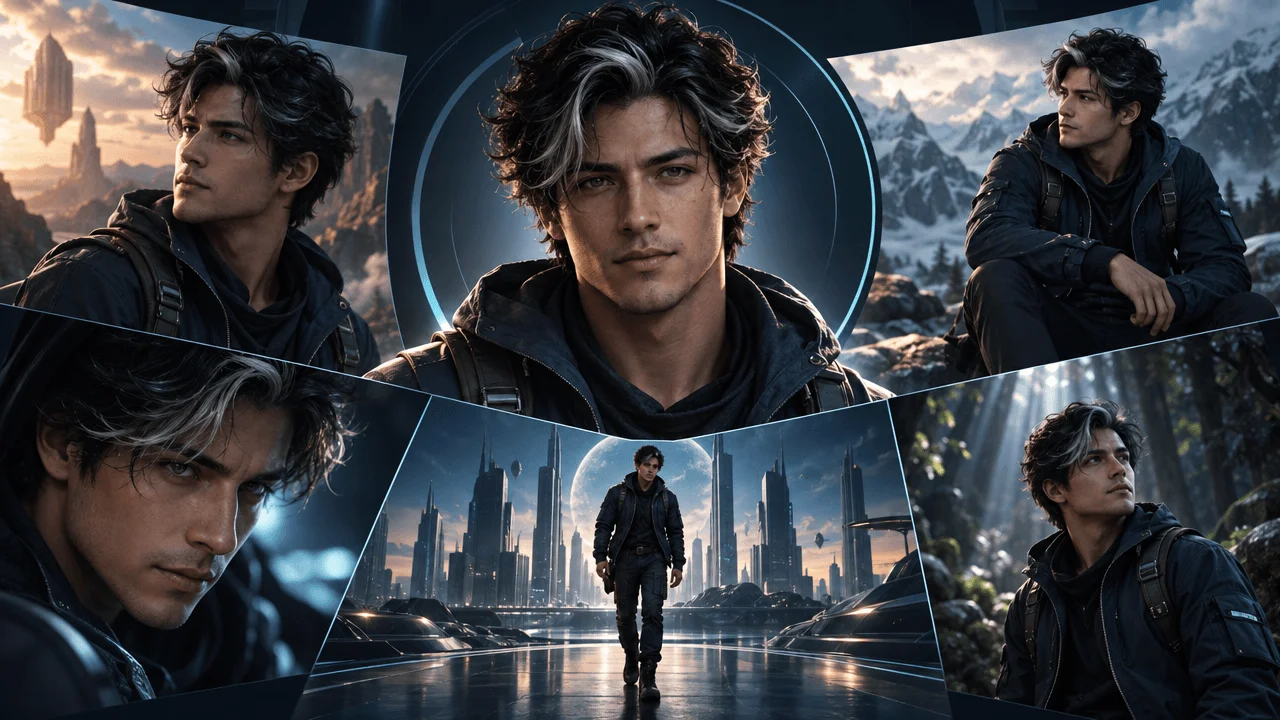
The fastest way to make an AI-generated YouTube video feel fake is to let the main character change every scene.
Scene one shows a young creator in a black hoodie.
Scene two shows a different face.
Scene three changes the outfit.
Scene four changes the body shape.
Scene five looks like a totally different person.
The script might be strong. The visuals might look expensive. The pacing might be good.
But the viewer still feels something is wrong.
That is the real problem consistent character AI solves.
For faceless YouTube creators, character consistency is not a small visual detail. It is production trust. If your main character, mascot, narrator, fictional founder, customer avatar, or recurring visual subject keeps changing, the video feels like a random pile of AI scenes instead of one finished production.
This guide breaks down how to use consistent character AI for YouTube videos, why most creators get it wrong, how to keep the same person across multiple scenes, and how OverseerOS Auto Edit and OverseerOS Character Lock help creators build more stable faceless videos from scripts, voiceovers, scene prompts, and reference images.
Key Takeaways
- Consistent character AI helps keep the same character identity across multiple YouTube scenes.
- The goal is not to clone real people or copyrighted characters. The goal is to preserve an original character’s repeatable visual traits.
- For faceless videos, character drift makes the video feel cheap because there is no on-camera host holding the viewer’s trust.
- A strong character workflow starts with a reference image, then extracts stable traits like face shape, body proportions, clothing, colors, style, and must-keep details.
- Character consistency works best when combined with script-first scene planning, style direction, voiceover timing, and scene-by-scene review.
- OverseerOS Character Lock is built to help creators upload a character reference and turn it into reusable Character DNA for OverseerOS Auto Edit scenes.
- Creators should avoid using AI to copy real people, celebrities, copyrighted characters, or another creator’s identity without permission.
What Is Consistent Character AI?
Consistent character AI is a workflow that helps keep the same character visually stable across multiple AI-generated images or video scenes.
Instead of generating each scene from scratch and hoping the person looks similar, the workflow uses a character reference and repeatable traits.
Those traits can include:
- Face shape
- Hair style
- Body proportions
- Clothing
- Accessories
- Signature colors
- Render style
- Character role
- Must-keep features
- Avoid rules
For YouTube creators, this matters because a video is not one isolated image.
A faceless YouTube video might need 30, 80, or 150 scenes.
If the same character appears in many scenes, the viewer expects visual continuity.
Without consistency, the character becomes unstable.
And unstable characters make AI videos look unfinished.
Why Character Consistency Matters More on YouTube Than in Single Images
A single AI image can look amazing even if the character only exists once.
A YouTube video is different.
The viewer sees the character repeatedly.
They build a mental model:
“This is the person I am following through the story.”
If that person keeps changing, the viewer subconsciously loses trust.
This is especially dangerous for:
- Faceless documentaries
- Psychology storytelling videos
- AI founder stories
- Business explainers
- Finance videos
- Fictional case studies
- Educational videos
- Shorts with recurring characters
- Brand mascots
- Story-based channels
In a normal on-camera channel, the host creates continuity.
In a faceless channel, the visuals create continuity.
If the visuals drift, the video loses identity.
The Core Problem: AI Models Are Good at Scenes, Weak at Memory
Most AI image and video tools are good at generating one impressive result.
The hard part is keeping that result stable over time.
Researchers working on multi-scene AI video have pointed out the same challenge: generating a single scene is easier, but multi-scene generation requires preserving the same key content and visual appearance across multiple scenes. Source: VideoStudio paper
More recent character-stable AI video research also shows why reference images and visual anchors matter. A 2025 paper on character-stable AI video stories found that removing visual anchoring caused a major drop in character consistency, which supports what creators already see in practice: text prompts alone are usually not enough. Source: Character-Stable AI Video Stories
In simple creator language:
If you want the same character across many scenes, give the AI something stable to hold onto.
That “something” is the character reference.
Character Drift: The Silent Killer of AI YouTube Videos
Character drift happens when the character slowly changes across scenes.
It can show up as:
- Different facial structure
- Different age
- Different hair
- Different skin tone
- Different outfit
- Different body type
- Different style
- Different accessories
- Different mood
- Different realism level
The problem is not always obvious in one scene.
But across a full video, it becomes painful.
Example:
Scene 1:
A faceless young entrepreneur in a black hoodie working at a dark desk.
Scene 2:
A middle-aged man in a blue suit walking through an office.
Scene 3:
A cartoon character holding a laptop.
Scene 4:
A different person with the same “creator” label but no shared traits.
That is not a consistent character.
That is a broken visual identity.
Consistent Character AI vs AI Avatar Generators
Do not confuse consistent character AI with a basic AI avatar generator.
They solve different problems.
| Tool Type | Main Job | Best For | Main Weakness |
|---|---|---|---|
| AI avatar generator | Creates one profile-style character | Headshots, profile images, simple branding | Often not built for multi-scene YouTube videos |
| Talking avatar tool | Makes one avatar speak | Explainers, training videos, presenter-style content | Can feel static or template-based |
| AI image generator | Creates individual visuals | One-off images, thumbnails, concept art | Character identity may drift between scenes |
| AI video generator | Creates clips | Short motion tests, cinematic clips | Multi-scene continuity can be weak |
| Consistent character AI workflow | Preserves character identity across many scenes | Faceless YouTube videos, story videos, recurring characters | Needs strong reference, prompt discipline, and review |
For YouTube, you usually need more than an avatar.
You need a character system.
A character system defines:
- Who the character is
- What must stay the same
- What can change
- What visual style they belong to
- What scenes they appear in
- What the AI must avoid
That is where consistent character AI becomes useful.
What Makes a Character “Consistent”?
A character is consistent when the viewer can recognize them across different scenes, poses, environments, and camera angles.
They do not need to be frozen in one position.
They should be flexible but recognizable.
Think of consistency in four layers.
1. Identity Consistency
This is the basic question:
Does this look like the same person or character?
Identity consistency includes:
- Face shape
- Age range
- Body proportions
- Hair style
- Signature expression
- Recognizable silhouette
Example:
Bad:
A young female creator in scene one becomes an older male executive in scene two.
Good:
The same faceless female creator appears from different angles while keeping the same hair, outfit, body proportions, and color palette.
2. Outfit Consistency
Clothing is one of the easiest ways to keep continuity.
If the character changes outfit every scene, the viewer may read it as a new character.
For YouTube videos, outfit consistency can be simple:
- Same black hoodie
- Same white lab coat
- Same red jacket
- Same glasses
- Same watch
- Same headset
- Same color palette
Example:
Same black hoodie, minimal silver watch, dark jeans, clean sneakers.
This is stronger than:
A creator wearing casual clothes.
Specific traits create stability.
3. Style Consistency
The character must stay inside the same visual world.
Do not switch from:
- Realistic cinematic
- To anime
- To 3D cartoon
- To stock photo realism
- To comic book style
Unless the style change is intentional.
A consistent character needs a consistent style medium.
Examples:
- Realistic cinematic documentary
- Clean 3D cartoon
- Premium SaaS editorial
- Dark psychological thriller
- Soft educational animation
- Luxury finance realism
The character can move through different scenes, but the render style should not randomly change.
4. Context Consistency
The character should feel like they belong in the video world.
If your video is about a solo creator building a YouTube channel, the recurring world might include:
- Dark desk setup
- Laptop
- Timeline editor
- Script document
- Analytics dashboard
- Voiceover waveform
- Production board
- Blue monitor glow
Those elements make the character feel grounded.
How OverseerOS Character Lock Works Inside OverseerOS Auto Edit
OverseerOS Character Lock is designed for creators who want a recurring original character to stay more stable across scenes in OverseerOS Auto Edit.
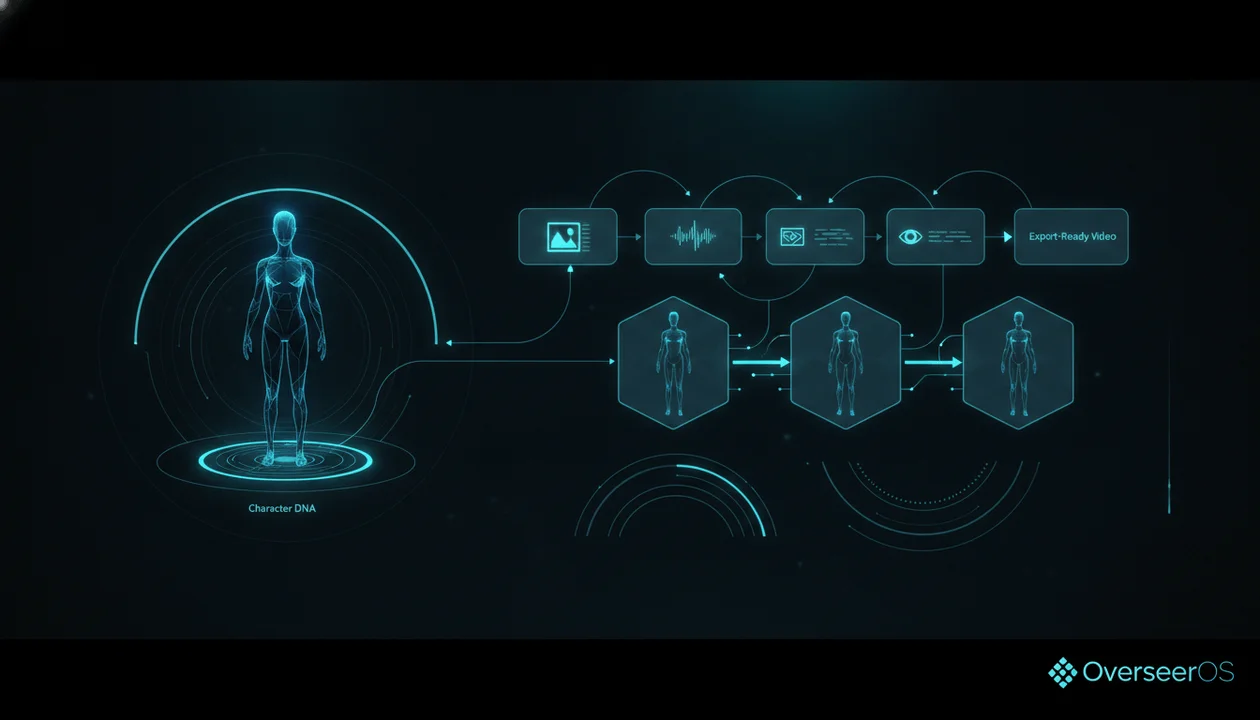
The idea is simple:
- Upload a character reference image.
- OverseerOS Character Lock analyzes the image.
- It extracts reusable Character DNA.
- That Character DNA helps guide future scene visuals inside the OverseerOS Auto Edit workflow.
The Character DNA can include details like:
- Identity description
- Face traits
- Body traits
- Clothing
- Colors
- Style medium
- Must-keep traits
- Avoid rules
This is important because the system is not just saving the image.
It is turning the reference into usable production direction.
A weak workflow says:
Use this person again.
A stronger workflow says:
Keep the same face shape, body proportions, signature colors, outfit, accessories, style medium, and key traits while changing only pose, camera angle, lighting, expression, and environment.
That is the difference between hoping for consistency and directing consistency.
Why OverseerOS Character Lock Is Built for Original Characters
The safest and strongest use case is not copying a real person.
It is creating an original recurring character for your own channel.
Examples:
- A faceless AI founder character
- A fictional student for educational videos
- A psychology story character
- A business owner avatar
- A finance narrator persona
- A futuristic AI assistant
- A historical explainer host
- A brand mascot
- A recurring customer in SaaS videos
- A fictional “viewer” character
This matters because creators should not use consistent character AI to copy celebrities, public figures, copyrighted characters, or another creator’s likeness without permission.
YouTube requires disclosure when AI meaningfully alters or generates realistic content that could make viewers think something real happened when it did not. Their guidance includes realistic AI-generated scenes, real people appearing to say or do things they did not do, and altered footage of real events or places. Source: YouTube Help
The clean creator standard is:
Build original characters you own. Do not imitate real people without consent.
That is better legally, ethically, and strategically.
The Best Workflow for Consistent Characters in YouTube Videos
Use this workflow when building faceless videos with recurring characters.
Step 1: Create the Character Before the Video
Do not invent the character scene by scene.
Define the character first.
Write a character brief:
Character name:
The Midnight Creator

Role:
A faceless solo YouTube creator building videos late at night.

Core visual identity:
Young adult creator, face mostly hidden by camera angle or shadow, black hoodie, slim build, dark desk setup, blue monitor glow.

Style:
Realistic cinematic SaaS documentary.

Must keep:
Black hoodie, faceless framing, same desk setup, blue light, focused body language.

Can change:
Pose, camera angle, screen content, lighting intensity, room angle, objects on desk.

Must avoid:
Readable copyrighted logos, celebrity likeness, random outfit changes, cartoon style, exaggerated facial details.
This gives the AI a stable foundation.
Step 2: Upload a Strong Reference Image
The reference image should clearly show the character traits you want to preserve.
A good reference image has:
- Clear character shape
- Clear outfit
- Clear color palette
- Clear style
- Minimal clutter
- No copyrighted character
- No celebrity resemblance
- No confusing background
- No extreme angle that hides everything important
Bad reference:
Blurry character, dramatic pose, face hidden, inconsistent lighting, crowded background.
Better reference:
Clean character shot with clear outfit, body proportions, style, and colors.
The reference does not need to be boring.
It just needs to be useful.
Step 3: Extract Character DNA
Character DNA is the reusable description of what must stay consistent.
It should include:
| Trait | Example |
|---|---|
| Identity | A faceless solo creator with a calm, focused presence |
| Face | Mostly hidden face, soft jawline |
| Body | Slim build, average height |
| Clothing | Black hoodie, dark jeans |
| Colors | Black, blue, silver |
| Style medium | Realistic cinematic |
| Must keep | Hoodie, faceless framing, desk setup, blue glow |
| Avoid | Logos, celebrity likeness, random outfit changes |
This turns a character into production rules.
Step 4: Write Scenes Around the Character
Do not throw the character into random environments.
Every scene should have a job.
Example script line:
“Most creators do not lose because they lack ideas. They lose because their workflow turns every idea into chaos.”
Bad scene prompt:
Creator working on laptop.
Better scene prompt:
The same faceless creator in a black hoodie sitting at the same dark desk, surrounded by messy script pages, AI image previews, and an unfinished editing timeline, blue monitor glow, realistic cinematic SaaS documentary style, frustrated but focused mood.
The second prompt keeps the character stable and supports the narration.
Step 5: Decide What Can Change
A consistent character does not mean every scene is identical.
You should allow controlled variation.
Can change:
- Pose
- Camera angle
- Expression
- Environment
- Lighting
- Action
- Object interaction
- Shot distance
- Background details
Must stay:
- Character identity
- Body proportions
- Main outfit
- Signature colors
- Style medium
- Core visual traits
This is the balance.
Too much freedom causes drift.
Too little freedom makes the video boring.
Step 6: Review Every Character Scene Before Export
Do not trust consistency blindly.
Review the timeline like a producer.
Ask:
- Does this still look like the same character?
- Did the outfit change?
- Did the body shape change?
- Did the face change too much?
- Did the style switch?
- Did the character become too realistic, too cartoonish, or too different?
- Does the scene match the voiceover?
- Does the character still fit the channel identity?
If a scene breaks continuity, fix it before export.
Character Consistency Checklist for YouTube Creators
Use this before publishing.
- The character has a clear reference image.
- The character has defined must-keep traits.
- The video uses one consistent visual style.
- The character does not change age, body type, or identity.
- Clothing and colors stay stable unless the script requires change.
- The scene prompts repeat the important character traits.
- The same character appears naturally across different scenes.
- No scene imitates a real person, celebrity, or copyrighted character without permission.
- The character supports the script instead of distracting from it.
- The final video feels like one connected production.
If the video fails this checklist, the viewer will feel the inconsistency even if they cannot explain it.
Example: Consistent Character AI for a Faceless YouTube Channel
Let’s say you run a faceless channel about AI entrepreneurship.
You want a recurring character:
A solo creator building a media business with AI.
Weak Character Direction
A creator working with AI.
This is too vague.
The AI can invent a new person every scene.
Strong Character Direction
Same faceless solo creator, black hoodie, slim build, face mostly hidden by camera angle or shadow, dark home office, blue monitor glow, realistic cinematic SaaS documentary style, focused body language, no logos, no readable copyrighted UI.
Now the character has identity.
Scene 1: Hook
Narration:
“The next generation of YouTube channels will not look like creators. They will look like tiny media companies run from a bedroom.”
Scene:
The same faceless solo creator in a black hoodie sitting at a dark desk at night, three monitors glowing blue, video timelines and script documents open, realistic cinematic SaaS documentary style, slow push-in, focused mood, no readable logos.
Scene 2: Problem
Narration:
“But most AI videos still look cheap because every scene feels like it came from a different universe.”
Scene:
The same faceless creator reviewing a messy timeline of mismatched AI scenes, one screen showing disconnected visuals in different styles, black hoodie and blue monitor glow consistent, frustrated body language, premium documentary style.
Scene 3: Solution
Narration:
“The fix is not more generation. The fix is stronger direction.”
Scene:
The same faceless creator organizing scene cards on a digital production board, each card connected to script lines, consistent dark office, black hoodie, blue glow, clean SaaS documentary style, confident focused mood.
This is how character consistency and scene direction work together.
Best YouTube Niches for Consistent Character AI
Consistent character AI works best when a recurring visual identity helps the viewer follow the story.
AI and Tech Channels
Use a recurring:
- Founder character
- AI assistant
- Solo creator
- Futuristic analyst
- Startup operator
Example video:
“How One Creator Runs a 10-Person Content Workflow With AI”
Psychology Channels
Use a recurring:
- Anonymous main character
- Relationship story character
- Inner-conflict character
- Social behavior example character
Example video:
“The Silent Habit That Makes People Lose Respect for You”
Finance Channels
Use a recurring:
- Investor character
- Broke-to-disciplined character
- Business owner
- Wealth-building narrator
Example video:
“Why Most People Stay Poor Even When Their Income Goes Up”
Education Channels
Use a recurring:
- Student avatar
- Mentor character
- Animated explainer host
- Curious learner
Example video:
“How Dopamine Actually Controls Your Motivation”
History Channels
Use a recurring:
- Narrator silhouette
- Historical guide
- Map-room analyst
- Archivist character
Example video:
“The Forgotten Decision That Changed an Empire”
Brand Channels
Use a recurring:
- Product guide
- Customer avatar
- Mascot
- Founder-style narrator
Example video:
“How to Turn One Idea Into a Finished YouTube Video”
Why Consistent Characters Improve Brand Memory
A recurring character gives your channel a visual anchor.
That anchor can help viewers recognize your content faster.
Think about what happens when a viewer sees the same character style repeatedly:
- The channel feels more intentional.
- The visuals feel less random.
- The audience remembers the format.
- The production feels more premium.
- The creator builds a recognizable world.
This is especially useful for faceless creators because they do not have a real human face on screen.
A consistent character can become part of the brand.
Not in a cheap mascot way.
In a production identity way.
How to Use OverseerOS Auto Edit With Consistent Characters
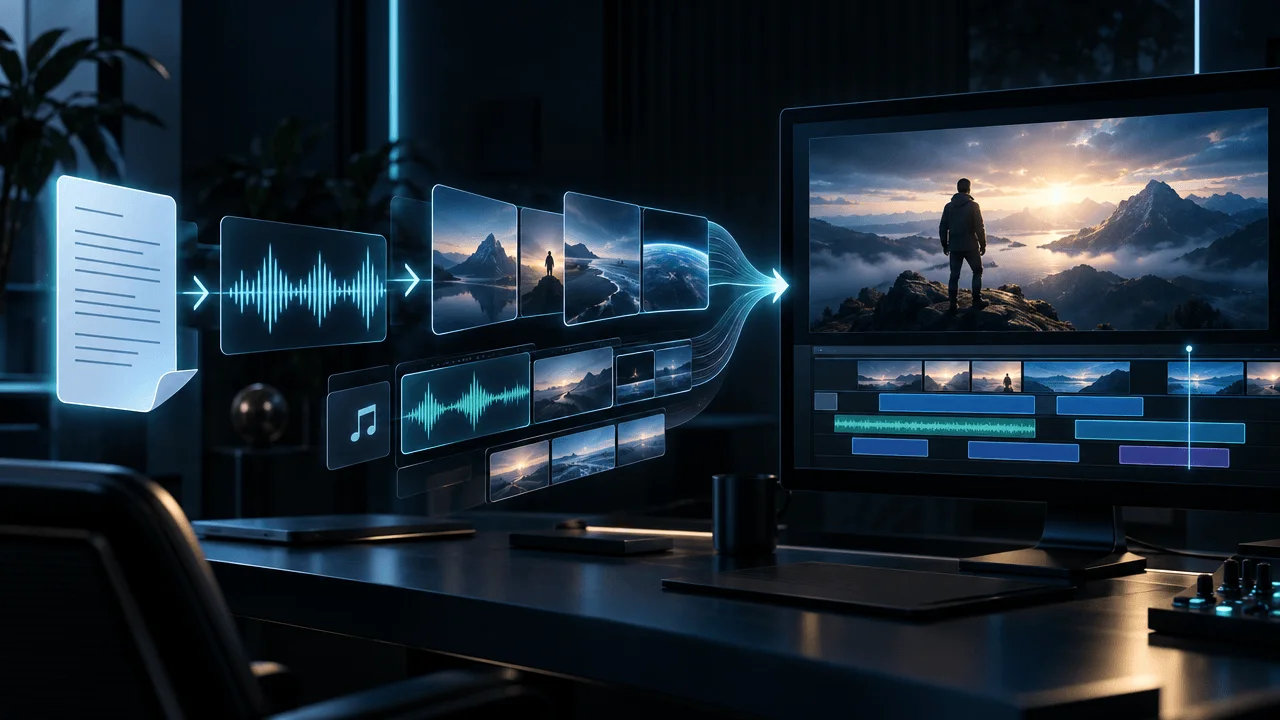
The strongest workflow is to combine OverseerOS Character Lock with OverseerOS Auto Edit.
A practical workflow looks like this:
- Create or upload an original character reference image.
- Use OverseerOS Character Lock to analyze the image into Character DNA.
- Build your script inside your content workflow.
- Generate or upload the voiceover.
- Use OverseerOS Auto Edit to turn the script and voiceover into scenes.
- Apply the character direction to scenes where the character appears.
- Use OverseerOS Style DNA or image style direction when you want the video to follow a specific visual look.
- Review the generated scenes for character drift.
- Adjust weak scenes before final export.
- Add captions, music, supported motion, and export.
This is stronger than using separate random tools because the character is part of the production system.
The goal is not just:
“Generate the same person.”
The goal is:
“Keep the same character inside a full YouTube video workflow.”
That is the difference.
Consistent Character Prompt Template
Use this template when creating scenes manually or reviewing AI-generated prompts.
Character reference:
[Describe or upload the character reference]

Character identity:
[Who the character is in the video]

Must keep:
[Face shape, body proportions, outfit, colors, accessories, style]

Can change:
[Pose, expression, lighting, camera angle, environment]

Scene narration:
[Paste the exact voiceover line]

Scene purpose:
[Hook, problem, example, proof, transition, payoff]

Scene visual:
[What the viewer should see]

Style:
[Realistic cinematic, clean 3D, SaaS documentary, educational animation, etc.]

Mood:
[Focused, tense, curious, calm, dramatic, inspired]

Camera/motion:
[Slow push-in, pan, close-up, over-the-shoulder, wide shot, etc.]

Avoid:
[Real-person likeness, copyrighted characters, logos, random outfit changes, style changes]
Example:
Character identity:
Faceless solo creator building a media business with AI.

Must keep:
Black hoodie, slim build, hidden face, blue monitor glow, dark desk setup, realistic cinematic SaaS documentary style.

Can change:
Pose, screen content, camera angle, lighting intensity, desk objects.

Scene narration:
“The problem is not that AI cannot make visuals. The problem is that every visual needs direction.”

Scene visual:
The same faceless creator organizing scattered AI images into a clean production board, each scene card connected to a line of narration.

Style:
Premium realistic SaaS documentary.

Mood:
Focused, controlled, strategic.

Camera/motion:
Slow push-in from behind the creator toward the production board.

Avoid:
Readable logos, celebrity likeness, cartoon style, different clothing, different body shape.
Common Mistakes With Consistent Character AI
Mistake 1: Using a Weak Reference Image
If the reference image does not clearly show the character, the AI has less to preserve.
Use a reference that clearly communicates:
- Outfit
- Style
- Body shape
- Colors
- Character role
- Visual identity
Mistake 2: Changing Too Many Traits at Once
If every scene changes the outfit, lighting, camera angle, environment, and style, the character will drift.
Change one or two things at a time.
Keep the identity stable.
Mistake 3: Over-Describing the Character
Too much detail can confuse the model.
You want important traits, not a novel.
Weak:
A person with thousands of tiny details, complex clothing, many accessories, extreme lighting, unusual pose, cinematic background, multiple colors, dramatic face, magical effects.
Better:
Same faceless creator, black hoodie, slim build, hidden face, blue monitor glow, dark desk setup, realistic cinematic style.
Simple traits are easier to preserve.
Mistake 4: Forgetting Style Medium
A character can drift even if the face is similar.
If one scene is realistic and the next is cartoon, the viewer still feels the break.
Always define the style medium.
Mistake 5: Using Real People Without Consent
Do not use consistent character AI to reproduce a real person’s likeness without permission.
This includes:
- Celebrities
- Public figures
- Influencers
- Competitors
- Actors
- Other creators
- Private individuals
Build original characters instead.
Mistake 6: Publishing Without Reviewing the Timeline
Consistency needs review.
AI can get close, but you still need to inspect the final timeline.
Do not publish a scene just because it looks good by itself.
Ask whether it fits the whole video.
How to Fix Character Drift
If your character keeps changing, fix the system.
Problem: Outfit Changes Every Scene
Fix:
- Repeat the outfit in every scene prompt.
- Keep clothing simple.
- Use one signature color.
- Avoid vague words like “casual clothes.”
Problem: Face Changes Too Much
Fix:
- Use a stronger reference image.
- Keep the face partially hidden if the channel is faceless.
- Define face shape in simple terms.
- Avoid extreme close-ups unless needed.
Problem: Style Keeps Changing
Fix:
- Define one style medium.
- Repeat it across all scene prompts.
- Avoid mixing cinematic, cartoon, anime, and stock photo language.
Problem: Character Looks Like a Different Age
Fix:
- Include age range.
- Avoid conflicting words like “young founder” in one scene and “experienced executive” in another.
- Keep body and face descriptors consistent.
Problem: Character Becomes Too Generic
Fix:
- Add signature traits.
- Use one repeated accessory.
- Use one repeated environment.
- Use one repeated color palette.
When You Should Not Use a Consistent Character
Not every video needs a recurring character.
You may not need one if:
- The video is purely infographic-based.
- The video uses abstract visuals.
- The channel style is documentary footage only.
- The video does not follow a human story.
- The topic is better served with objects, locations, charts, or symbolic scenes.
Do not force a character into every video.
Use consistent characters when they improve clarity, emotion, identity, or brand memory.
Consistent Character AI vs Style DNA
Character consistency and style consistency are connected, but they are not the same.
| Concept | What It Controls | Example |
|---|---|---|
| Character consistency | Who appears in the scenes | Same faceless creator, same outfit, same body proportions |
| Style consistency | How the video looks | Dark cinematic documentary, blue lighting, realistic texture |
| Scene consistency | How the visuals match the narration | Every scene supports the exact voiceover line |
| Brand consistency | How the channel feels across videos | Same pacing, visual world, title style, thumbnail direction |
A strong faceless channel needs all four.
This is where OverseerOS Auto Edit becomes useful because the workflow can combine OverseerOS Character Lock, OverseerOS Style DNA, script-to-scene structure, voiceover timing, captions, music, supported motion, and export controls.
Practical Character Bible for Faceless YouTube
If you plan to reuse a character across many videos, create a character bible.
Character name:
[Internal name only]

Channel role:
[Host, customer, founder, student, narrator, analyst, villain, etc.]

Visual identity:
[One sentence describing the character]

Face:
[Shape, visibility, hair, expression style]

Body:
[Build, posture, proportions]

Clothing:
[Outfit, accessories]

Colors:
[Main color palette]

Style medium:
[Realistic, 3D cartoon, cinematic, documentary, educational animation]

Recurring environment:
[Desk, office, city, lab, classroom, archive room, etc.]

Signature props:
[Laptop, notebook, headset, phone, chart, map, etc.]

Must keep:
[3 to 6 traits]

Can change:
[Pose, camera angle, expression, environment, lighting]

Must avoid:
[Logos, real-person likeness, copyrighted character traits, random clothing, style changes]

Best use cases:
[Hook scenes, problem scenes, examples, payoff scenes, etc.]
This turns your character into a reusable brand asset.
Not just a random image.
Final Verdict
Consistent character AI is one of the biggest quality upgrades for faceless YouTube videos.
Not because every channel needs a mascot.
Because continuity makes AI videos feel intentional.
If the same character changes every scene, the viewer feels the video is fake, rushed, and low-trust.
If the character stays stable, the video feels more premium, more directed, and easier to follow.
The strongest workflow is simple:
Create an original character.
Upload a clear reference.
Extract the Character DNA.
Define what must stay the same.
Use the character only where it helps the story.
Review every scene before export.
That is exactly why OverseerOS Character Lock exists inside OverseerOS Auto Edit.
It helps creators turn an original character reference into reusable visual direction so their faceless YouTube videos can keep the same character across scenes instead of drifting into random AI output.
If you are building faceless videos and want consistent characters, matching scenes, style direction, captions, music, supported motion, and export controls in one workflow, start with OverseerOS Auto Edit.
The future of AI YouTube is not random generation.
It is directed production.
FAQ
What is consistent character AI for YouTube videos?
Consistent character AI helps keep the same character visually stable across multiple YouTube scenes. It uses a reference image or character traits to preserve identity, clothing, colors, body proportions, and visual style throughout the video.
Why do AI characters change between scenes?
AI characters change between scenes because each generation may be treated as a separate output. Without a strong reference image, repeated character traits, and scene-by-scene direction, the model may reinvent the character every time.
How do I keep the same AI character across YouTube scenes?
Start with a clear character reference image, define must-keep traits, repeat key character details in scene prompts, keep one visual style, review every scene, and regenerate any scene where the character drifts.
Can OverseerOS Auto Edit keep characters consistent?
OverseerOS Auto Edit includes OverseerOS Character Lock, which is designed to help creators upload a character reference image and turn it into reusable Character DNA for more stable character direction across supported scenes.
What is OverseerOS Character Lock?
OverseerOS Character Lock is a consistent character workflow inside OverseerOS Auto Edit. It analyzes an uploaded reference image and extracts reusable traits such as identity, face, body, clothing, colors, style medium, must-keep traits, and avoid rules.
Should I use real people as AI character references?
Only use real people if you have proper rights and consent. For most YouTube creators, the safer and stronger approach is to create original fictional characters instead of imitating celebrities, public figures, competitors, or private individuals.
Do AI-generated characters need disclosure on YouTube?
Sometimes. YouTube requires disclosure when AI-generated or meaningfully altered realistic content could make viewers think something real happened when it did not. Creators should review YouTube’s current GenAI disclosure guidance before uploading realistic AI-generated content.
What kind of reference image works best for consistent characters?
A good reference image clearly shows the character’s outfit, body proportions, color palette, visual style, and defining traits. Avoid blurry images, copyrighted characters, celebrity likenesses, cluttered backgrounds, and extreme angles that hide important details.
Can consistent character AI work for faceless channels?
Yes. Consistent character AI is especially useful for faceless channels because the visuals carry the production identity. A stable recurring character can make faceless videos feel more premium, branded, and easier to follow.
Is consistent character AI useful for YouTube Shorts?
Yes. Shorts move fast, so character drift can be even more noticeable. A consistent recurring character can help Shorts feel like part of the same channel instead of disconnected AI clips.