Most creators do not have an idea problem.
They have a planning problem.
They collect notes in one app, save competitor links in another, dump title ideas in a doc, sketch thumbnail thoughts in their head, and then wonder why the script feels messy when it is finally time to write. By that point, the real damage is already done. The video was weak before the first paragraph existed.
That is where a good YouTube mind map tool becomes useful.
Not as a study toy. Not as a pretty diagram generator. As a real pre-production system for turning research, audience pain, video angles, packaging ideas, and script structure into one connected plan.
The smartest creators do not start from a blank page. They start from patterns that already worked.
This guide explains what a YouTube mind map tool should actually do, how to use one without overcomplicating your workflow, what most tools miss, and how to turn a mind map into a better title, thumbnail, hook, and script.
Key takeaways
- A YouTube mind map tool should help you plan videos, not just summarize them.
- The best maps connect topic research, audience pain, title promise, thumbnail direction, hook, and script structure in one view.
- Most “YouTube to mind map” tools are built for learning and note-taking, not creator pre-production.
- YouTube’s own Inspiration tab is useful for brainstorming, but it is desktop-only, English-only, and explicitly warns that AI outputs can vary in quality. Source: YouTube Help
- A visual planning workflow is most valuable before the full script, when the idea is still cheap to improve.
- Mind maps work best when they reduce confusion, not when they become giant decorative spiderwebs.
- If you want a faster way to connect research, planning, and scripting, you can reverse-engineer high-performing YouTube videos with OverseerOS and turn those patterns into a working visual plan.
What is a YouTube mind map tool?
A YouTube mind map tool is a visual planning system that helps creators organize a video idea before they script it.
A serious one should help you map:
- the main video idea
- the target viewer
- the viewer problem
- the angle
- the proof or research
- the title direction
- the thumbnail direction
- the hook
- the section flow
- the CTA
A weak tool gives you a map of information.
A strong tool gives you a map of decisions.
That difference matters.
If your mind map only says:
- AI tools
- thumbnails
- script
- tips
- examples
you do not have a plan yet.
If your map says:
- viewer problem: overwhelmed by disconnected AI tools
- angle: fewer tools, better workflow
- title promise: which tools actually save time
- thumbnail idea: “Only 4 Survived”
- hook: “I tested 27 tools so you do not waste the next 30 days”
- section flow: research, filtering logic, winners, workflow
now you have something you can build.
Why creators need a mind map before the script
Many scripts feel bloated because the thinking happened too late.
The creator starts writing before answering the hard questions:
- Why would someone click this?
- What belief is this video changing?
- What proof makes the angle credible?
- What should the thumbnail imply that the title does not?
- Which section earns the next section?
A mind map forces those questions into view before you waste time polishing the wrong concept.
That makes it useful for:
- faceless channels that need stronger structure
- agencies managing multiple videos at once
- solo creators who research in fragments
- channels using competitor research before production
- teams handing work from strategist to writer to editor
A script is linear.
A good video idea is not.
Before scripting, your thinking is messy, branching, and non-linear. A visual map matches that stage better than a blank document does.
What most YouTube mind map tools get wrong
Most tools ranking for this problem are not really built for creators.
They usually fall into three buckets.
1. Study-summary tools
Tools like MindLM and similar “YouTube to mind map” products focus on turning one video into structured notes from subtitles or transcripts. That is useful for lectures, explainers, podcasts, and research review. It is not the same thing as planning your own video. MindLM
These tools are built to answer:
What did this video say?
Creators usually need to answer:
What should my video say, and how should I package it?
That is a different job.
2. Generic idea generators
Some creator tools promise brainstorming, but the output is often just more ideas, not clearer decisions.
A generic brainstorm tool can give you twenty possible topics.
That sounds productive until you realize none of those topics have:
- a proven angle
- a packaging direction
- a hook strategy
- a reason this specific channel should make them now
More ideas do not automatically create better videos.
3. Project boards without idea structure
Workflow tools like FrameFlow are useful for managing production stages like idea, script, thumbnail, editing, review, and publish. That solves organization. But an organized bad idea is still a bad idea. FrameFlow
A board helps you track progress.
A mind map should help you sharpen the idea before progress begins.
The difference between a study map and a creator map
This is the distinction most articles skip.
| Type | Main job | Best use | Main weakness |
|---|---|---|---|
| YouTube study map | Summarize an existing video | Learning, note-taking, lecture review | Does not plan your own packaging or script |
| Creator brainstorming map | Expand possible ideas | Early ideation | Can create too much sprawl |
| Creator planning map | Turn one angle into a video plan | Pre-production, scripting, packaging | Requires a clearer workflow |
| Production board | Track status and handoffs | Team execution | Too late if the idea is weak |
If you are a creator, the sweet spot is not just “turn video into map.”
It is:
turn research into a production-ready video structure.
That is a higher standard.
What a good YouTube mind map tool should include
A YouTube mind map tool should help you think through the video in layers.
Layer 1: The core idea
At the center of the map, define the actual video.
Not the broad topic.
The video.
Weak:
YouTube thumbnails
Stronger:
Why good thumbnails still fail when the title repeats the same promise
Weak:
AI tools
Stronger:
Which AI tools deserve a place in a serious YouTube workflow
The center node should be specific enough that the rest of the map has direction.
Layer 2: The viewer problem
This is usually the first missing piece.
Ask:
- What is the viewer struggling with?
- What expensive mistake are they making?
- What confusion are they stuck in?
- What result are they chasing?
Example:
The viewer has ideas, but they all feel vague, repetitive, or hard to commit to.
That changes the whole map.
Now you are not making a video “about brainstorming.”
You are making a video about reducing decision friction before production.
Layer 3: The proof nodes
This is where creators usually save random links without structure.
A better map separates proof into branches like:
- competitor examples
- breakout videos
- audience comments
- search demand
- related patterns
- objections
- counterexamples
This lets you see whether the video actually has enough support.
If the proof is weak, fix the idea before scripting.
Layer 4: The packaging nodes
This is where most mind map tools for creators should be better.
You need branches for:
- title promise
- thumbnail tension
- hook angle
- emotional trigger
- audience expectation
If the title and thumbnail are not visible in the plan, the script often drifts.
That is one reason so many YouTube videos feel disconnected from the click.
Layer 5: The script path
Only after the idea, proof, and packaging are clear should the script branch appear.
This is where you map:
- opening hook
- section 1
- section 2
- section 3
- examples
- contrast point
- final takeaway
- CTA
That flow should feel inevitable by the time you start writing.
The 7-node YouTube mind map template
Use this when planning almost any educational, commentary, faceless, or strategy video.
| Node | Question it answers | Example |
|---|---|---|
| Core idea | What is this video really about? | YouTube mind map tool for creators |
| Viewer problem | Why does the viewer care? | Their ideas are scattered and hard to turn into scripts |
| Proof | Why should this angle be trusted? | Competitor patterns, creator workflow examples, product research |
| Title promise | Why would someone click? | Plan Better Videos Before You Script |
| Thumbnail direction | What visual tension sells the click? | “Messy Notes” vs “Clear Map” |
| Hook | How does the opening continue the promise? | “Most creators do not fail in scripting. They fail before scripting.” |
| Section flow | What must the video cover in order? | problem, tool criteria, workflow, template, mistakes, verdict |
If your map cannot answer all seven, the video is not ready.
A practical workflow for using a YouTube mind map tool
Here is the workflow serious creators should use.
Step 1: Start with one video decision, not a broad niche
Do not open the map with:
finance ideas
Open with:
Why most finance channels explain the topic but fail to sell the click
That gives the map a job.
Step 2: Add proof before adding sections
Most people start building sections immediately.
That is backwards.
First add:
- three to five competitor references
- one or two breakout examples
- likely viewer objections
- the belief shift you want by the end
Now your outline has pressure behind it.
Step 3: Build title and thumbnail branches before the script branch
This is where the map becomes a creator tool instead of a note-taking tool.
Ask:
- What is the exact promise of the title?
- What is the thumbnail adding that the title is not?
- What feeling should the click create?
- What question should the viewer need answered?
If you skip this, you often write a script for a different video than the packaging sells.
Step 4: Turn the branches into a section path
Your section path should not just be “intro, tips, conclusion.”
A stronger path is:
- Name the problem.
- Explain why common solutions fail.
- Introduce the better framework.
- Show the workflow.
- Give a reusable template.
- Warn against common mistakes.
- End with a clear next step.
That structure is easier to script because each section has a purpose.
Step 5: Kill weak branches fast
A good map is not a storage unit.
Delete branches that do not strengthen the video.
Common dead-weight branches:
- interesting but irrelevant facts
- examples that do not change the argument
- titles that sound good but do not match the viewer problem
- side topics that belong in another video
Clean maps create cleaner scripts.
YouTube Studio Inspiration vs a dedicated YouTube mind map tool
YouTube’s Inspiration tab is a legitimate reference point here.
According to YouTube Help, the Inspiration tab can generate and brainstorm ideas, titles, thumbnails, and outlines. It is desktop-only, currently gives English-only suggestions, and YouTube explicitly notes that the AI outputs may be inaccurate or inappropriate and can vary in quality. Source: YouTube Help
That makes it useful, but limited.
| Tool type | Strength | Limitation |
|---|---|---|
| YouTube Studio Inspiration | Native idea prompts, title/thumbnail suggestions, audience-aligned brainstorming | English-only, desktop-only, not built as a visual planning workspace |
| Generic YouTube-to-mindmap tools | Good for summarizing one video fast | Built more for study and note extraction than creator planning |
| Creator ideation tools | Better for rough idea expansion | Often weak on structure and visual planning |
| Creator mind map workflow | Best for connecting research, packaging, and script structure | Requires a more intentional process |
If your workflow is:
give me a few starting ideas
YouTube Studio Inspiration can help.
If your workflow is:
help me connect research, angle, title, thumbnail, hook, and structure in one view
you need something more visual and creator-specific.
How OverseerOS fits this workflow
This is where OverseerOS has a real advantage.
OverseerOS is built around the idea that creators should work from proven public patterns instead of random prompts. That matters because a visual planning tool is only powerful if the inputs are good.
Inside OverseerOS, the broader workflow can already help with channel analysis, competitor research, titles, thumbnails, scripts, and planning. For the visual planning layer specifically, MindOS is designed as an infinite canvas workspace for brainstorming, research, and historical event mapping, with map saving and direct conversion into script outlines. That is visible in the codebase and in the product UI.
In practical terms, that means you can use OverseerOS to:
- brainstorm on an infinite canvas instead of a blank document
- switch between brainstorming, research, and history-style mapping modes
- use live web-supported research inside the planning workflow
- save and revisit maps instead of losing ideas in scattered notes
- convert a mind map into a structured script outline instead of manually rebuilding it later
That is the bigger point.
A good mind map tool should not stop at “here is your map.”
It should help you move from:
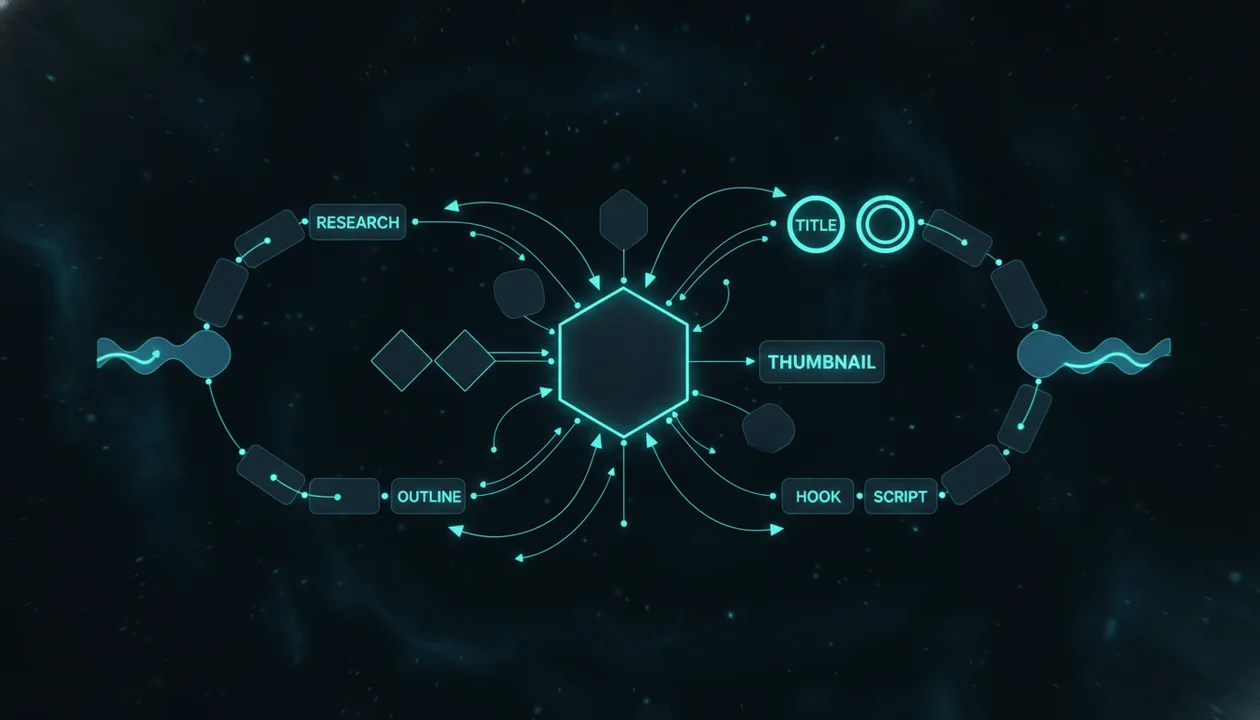
research -> angle -> packaging -> outline -> script
If you want a connected creator workflow for research, planning, scripts, and packaging, that bridge is where OverseerOS feels more useful than a generic study map tool.
The faster way to turn a map into a real video
Here is the practical shift.
Most creators brainstorm like this:
topic -> more topics -> maybe a title -> maybe a script
A better workflow is:
proven pattern -> angle -> title promise -> thumbnail direction -> hook -> section flow -> script
That sequence creates fewer weak drafts.
If you already use a brief-first workflow, the map becomes even stronger when paired with a production brief. After the visual thinking is clear, turn it into a clean execution plan with an AI YouTube video brief generator.
That handoff matters because a strategist, writer, editor, or voiceover artist can work faster when the idea is already structured visually.
A creator-ready YouTube mind map example
Let’s say the video idea is:
Best AI YouTube tools for faceless channels
A weak map might look like this:
- AI tools
- thumbnails
- scripts
- editing
- SEO
That is generic.
A stronger map would look like this:
Center node
Best AI YouTube tools for faceless channels
Viewer problem
- too many disconnected tools
- creators waste time switching between apps
- most tools speed up tasks but do not improve topic selection
Proof
- competitors using tool stacks
- recurring breakdowns in workflow videos
- common creator complaints: scripts, thumbnails, voiceovers, research
- gaps between ideation and production
Title promise
- The stack that actually builds better videos
Thumbnail direction
- “7 Tools” is weak
- stronger: one stack replacing a mess of apps
- visual tension: chaos vs system
Hook
- “Most faceless creators do not need more tools. They need fewer tools that connect.”
Section flow
- Why faceless creators get stuck
- What a real stack should cover
- Best tools by workflow stage
- Common stack mistakes
- Best overall system
Now the script almost writes itself.
That is what a useful mind map does.
Common mistakes when using a YouTube mind map tool
Mistake 1: Mapping too early with no angle
If the center node is vague, the whole map gets vague.
Pick the exact video, not the broad category.
Mistake 2: Treating the map like storage
A map is not a dumping ground for every thought you had this week.
It should clarify the video, not preserve every possibility forever.
Mistake 3: Skipping title and thumbnail branches
This is one of the biggest mistakes.
If the packaging is missing from the map, the script is more likely to drift away from what the click promised.
Mistake 4: Using only one source video
Many “YouTube to mind map” tools are really summarizers.
That is fine for research, but creators should usually combine:
- competitor examples
- breakout patterns
- viewer pain
- original angle
- channel fit
Mistake 5: Confusing complexity with quality
A giant map with 80 nodes is not automatically better than a clean map with 12 strong ones.
Useful maps reduce ambiguity.
Mistake 6: Not converting the map into the next deliverable
The map is not the finish line.
The next step should be clear:
- outline
- brief
- title shortlist
- thumbnail shortlist
- script draft
If the map never becomes the next asset, it was probably too abstract.
The YouTube mind map checklist
Use this before moving into scripting.
- The center node names one clear video, not a broad niche.
- The viewer problem is visible in plain language.
- The map includes proof, not just opinions.
- The title branch shows a specific click promise.
- The thumbnail branch adds tension instead of repeating the title.
- The hook branch continues the click promise immediately.
- The section path has a clear progression.
- Weak or irrelevant branches have been deleted.
- The map can be turned into an outline without guessing.
- The final video still feels original, not copied from another creator.
Final verdict
A YouTube mind map tool is useful when it helps you make better video decisions before the script.
That is the real value.
Not prettier notes. Not more branches. Not a clever export button.
The best tool helps you connect idea, proof, packaging, and structure so the script starts from clarity instead of chaos.
If you only need to summarize a lecture or one source video, a standard YouTube-to-mindmap tool can be enough.
If you are a creator trying to build stronger videos, you need something closer to a planning system than a study aid.
That is why the most effective workflow is not starting from a blank page. It is starting from proven patterns, mapping the idea visually, then turning that map into a real production plan.
If you want to do that inside one system, start by using OverseerOS to reverse-engineer proven YouTube patterns, build your map in MindOS, and move from visual planning into scripting without losing the thread.
FAQ
What is a YouTube mind map tool?
A YouTube mind map tool helps creators visually organize a video idea before scripting. A strong one should connect the viewer problem, research, title promise, thumbnail direction, hook, and section flow in one workspace.
Is a YouTube mind map tool the same as a YouTube video summarizer?
No. A summarizer turns an existing video into notes or a structured map. A creator mind map tool helps you plan your own video before production.
Is YouTube Studio Inspiration enough for brainstorming?
It can be useful for early ideas. But YouTube says the feature is desktop-only, currently English-only, and that AI outputs may vary in quality. It is better as a starting point than a complete visual planning workflow. Source: YouTube Help
What should I put in a YouTube mind map?
At minimum, include the core idea, viewer problem, proof, title promise, thumbnail direction, hook, and section flow. If one of those is missing, the script will usually feel weaker.
How does OverseerOS help with visual planning?
OverseerOS connects visual planning to the rest of the creator workflow. MindOS is designed for brainstorming, research, and history mapping on an infinite canvas, and it can convert those maps into script outlines so you can move into production faster.