Faceless YouTube automation is one of the most misunderstood ideas in the creator economy.
Beginners hear the phrase and think it means:
Pick a niche, generate videos with AI, upload daily, and make passive income.
That version is mostly fantasy.
The real version is more powerful, but also more serious.
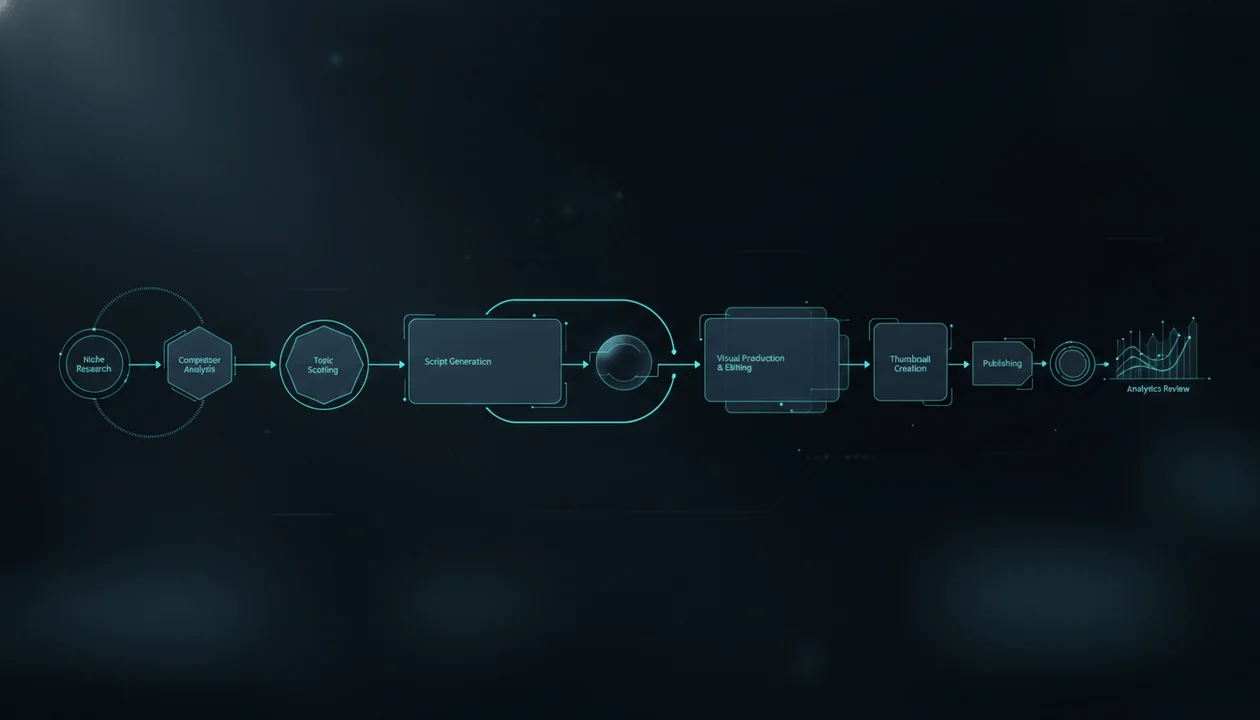
Faceless YouTube automation is not about removing quality. It is about building a repeatable production system where research, topics, titles, scripts, voiceovers, visuals, editing, thumbnails, metadata, publishing, and performance reviews are handled through a clear workflow.
The goal is not to make videos with no human judgment.
The goal is to stop rebuilding the entire process from scratch every time you publish.
A good automation system makes your channel faster, more consistent, and easier to scale.
A bad automation system turns your channel into low-effort AI content that viewers ignore and YouTube may not reward.
This guide breaks down how to automate a faceless YouTube channel the right way, what parts of the workflow can be automated, what should still be reviewed manually, how to avoid generic AI content, and how to build a production pipeline that can actually support long-term growth.
Key Takeaways
- Faceless YouTube automation does not mean “no work.” It means building a repeatable workflow for research, scripts, voiceovers, visuals, editing, thumbnails, metadata, and publishing.
- The best automation system improves quality and consistency. The worst automation system produces generic videos faster.
- A faceless YouTube channel still needs original value, clear positioning, strong packaging, human review, and content that viewers actually want to watch.
- YouTube says monetized content should be original and authentic, and warns against mass-produced or repetitive content with little educational or entertainment value. Source: YouTube Help
- YouTube’s AI disclosure rules focus on realistic AI-generated or meaningfully altered content that could mislead viewers about whether something real happened. Source: YouTube Help
- If your videos include sponsorships, paid product placements, endorsements, or commercial relationships, YouTube says you need to use the paid promotion disclosure setting. Source: YouTube Help
- The best automation stack starts with strategy, not tools.
What Is Faceless YouTube Automation?
Faceless YouTube automation is the process of running a YouTube channel without showing your face by using systems, tools, templates, AI, freelancers, and repeatable workflows to produce videos consistently.
A faceless automation workflow can include:
- Niche research
- Competitor analysis
- Topic discovery
- Title generation
- Thumbnail concepts
- Scriptwriting
- Voiceover generation
- Visual creation
- Editing
- Captions
- Metadata
- Scheduling
- Performance tracking
- Repurposing into Shorts
- Team task management
But here is the important part:
Automation does not mean the channel runs itself.
It means the production process is systemized.
You still need decisions.
You still need taste.
You still need quality control.
You still need a reason viewers should care.
The Wrong Way to Think About YouTube Automation
The weak version of faceless automation looks like this:
- Ask AI for 50 random video ideas.
- Generate a script from one sentence.
- Use a robotic voiceover.
- Add random stock footage.
- Generate a thumbnail with too much text.
- Upload with a keyword-stuffed description.
- Repeat every day.
- Wonder why nobody watches.
This is not a business.
This is a content factory with no strategy.
The problem is not AI.
The problem is that every step is disconnected.
The topic does not come from demand.
The title does not create curiosity.
The script has no retention structure.
The voice does not match the niche.
The visuals do not support the story.
The thumbnail does not create a reason to click.
The metadata is written after the video as an afterthought.
This is why so many “YouTube automation” channels fail.
They automate production before they understand value.
The Right Way to Think About YouTube Automation
The strong version looks like this:
- Pick a niche with demand and monetization potential.
- Study channels already getting views.
- Identify topic patterns, title formulas, and thumbnail styles.
- Build a content calendar around proven viewer problems.
- Create scripts with clear hooks, structure, and retention logic.
- Generate or record voiceovers that match the channel identity.
- Create visuals that support the script.
- Edit for pacing and clarity.
- Package the video with a strong title and thumbnail.
- Publish with clean metadata.
- Review performance.
- Improve the next batch.
That is automation.
Not mindless output.
A strong system turns every video into feedback for the next one.
Faceless YouTube Automation vs AI Slop
This distinction matters.
| Good Automation | Low-Effort AI Slop |
|---|---|
| Starts with proven demand | Starts with random prompts |
| Has a clear audience | Tries to target everyone |
| Uses AI to support human strategy | Uses AI to replace thinking |
| Scripts have hooks and structure | Scripts sound generic |
| Visuals support the story | Visuals are random |
| Voiceover matches the niche | Voiceover sounds robotic or mismatched |
| Thumbnails create clear click tension | Thumbnails look like templates |
| Metadata supports the video | Metadata is keyword stuffed |
| Videos are reviewed before publishing | Videos are uploaded raw |
| Workflow improves over time | Workflow repeats the same mistakes |
The goal is not to make “AI videos.”
The goal is to make videos viewers choose to watch.
What Parts of a Faceless YouTube Channel Can Be Automated?
Many parts can be automated or semi-automated.
But not all parts should be fully automated.
| Workflow Stage | Automation Level | Human Review Needed? |
|---|---|---|
| Niche research | Semi-automated | Yes |
| Competitor tracking | Automated | Yes |
| Topic discovery | Semi-automated | Yes |
| Title ideas | Semi-automated | Yes |
| Thumbnail concepts | Semi-automated | Yes |
| Script outline | Semi-automated | Yes |
| Full script | Semi-automated | Yes |
| Voiceover | Semi-automated | Yes |
| Visual generation | Semi-automated | Yes |
| Editing | Semi-automated | Yes |
| Captions | Automated | Yes |
| Metadata | Semi-automated | Yes |
| Scheduling | Automated | Light review |
| Analytics tracking | Automated | Yes |
| Repurposing | Semi-automated | Yes |
The more the content affects trust, accuracy, or viewer experience, the more human review matters.
The Faceless YouTube Automation Workflow
Use this as the full production system.
Step 1: Niche Validation
Do not automate a channel before validating the niche.
A niche should have:
- Viewer demand
- Repeatable topics
- Monetization potential
- Successful competitor channels
- Clear audience problems
- Search and browse potential
- Enough visual material
- A production workflow you can sustain
Bad niche selection creates a weak channel no matter how good your tools are.
Niche Validation Checklist
Before starting, ask:
- Are there successful faceless channels in this niche?
- Are newer channels still breaking through?
- Are there repeatable topic formats?
- Are viewers asking questions in comments?
- Are there products, sponsors, or affiliate offers?
- Can the videos be made without showing a face?
- Can the visuals be created legally?
- Can you make 50 to 100 video ideas?
- Can the niche support long-term content?
- Can you add a unique angle?
If the niche fails this checklist, do not automate it yet.
Fix the strategy first.
Step 2: Competitor Research
Competitor research is not copying.
It is market intelligence.
Study channels that already have attention.
Look for:
- Best-performing videos
- Breakout videos
- Repeated title formulas
- Thumbnail patterns
- Video length
- Upload rhythm
- Comment questions
- Sponsor placements
- Affiliate links
- Content pillars
- Hook styles
- Visual style
- Voiceover style
- CTA strategy
The goal is to understand what viewers already respond to.
What to Document
Create a competitor research sheet with:
| Field | Example |
|---|---|
| Channel name | AI Workflow Lab |
| Niche | AI tools for creators |
| Best video | Best AI Tools for YouTube Creators |
| Views | 420K |
| Title pattern | Best X for Y |
| Thumbnail pattern | Tool stack visual |
| Hook type | Mistake-based |
| Monetization | Affiliates, sponsors |
| Repeated topics | Tools, tutorials, comparisons |
| Opportunity | More honest beginner workflows |
This gives your automation system direction.
Step 3: Topic Discovery
A faceless YouTube automation system needs a steady topic engine.
You should not wake up every morning asking:
“What should we post today?”
That is not a system.
Build topic buckets.
Strong Topic Buckets
For a faceless AI creator tools channel:
- Best tools
- Tool comparisons
- Alternatives
- Tutorials
- Mistakes
- Workflows
- Case studies
- Buyer guides
- Trends
- Checklists
For a finance channel:
- Beginner mistakes
- Budgeting
- Investing basics
- App comparisons
- Money psychology
- Risk management
- Simple systems
- Saving strategies
- Debt
- Net worth tracking
For a business case study channel:
- Company rise
- Company failure
- Founder decisions
- Strategy breakdowns
- Market timing
- Product positioning
- Competition
- Hidden business models
- Lessons
- Modern parallels
Topic buckets make automation easier because every idea belongs to a strategy.
Step 4: Topic Scoring
Not every topic deserves production.
Score topics before writing scripts.
Use this table.
| Factor | Score 1 to 5 |
|---|---|
| Viewer demand | |
| Click potential | |
| Search intent | |
| Browse potential | |
| Monetization potential | |
| Competitor proof | |
| Production ease | |
| Evergreen value | |
| Unique angle | |
| Fits channel promise |
Prioritize topics with the highest total.
This prevents wasting production time on weak ideas.
Step 5: Title and Thumbnail Direction
A video should not enter scripting until the title and thumbnail direction are clear.
This is where many faceless automation channels fail.
They write the script first, then try to package it later.
Better workflow:
Topic → title angle → thumbnail concept → script
Why?
Because title and thumbnail define the promise.
The script must deliver that promise.
Example
Topic:
AI voiceover tools
Weak title:
Best AI Voiceover Tools
Stronger title:
AI Voiceover Tools for Faceless YouTube: Choose a Voice That Builds Trust
Thumbnail direction:
Split screen: “ROBOTIC” vs “TRUSTWORTHY” voice waveform with creator dashboard.
Now the script has a clear job:
Explain how to choose a voice that makes a faceless channel feel trustworthy.
That is stronger than a generic tool list.
Step 6: Script Automation
Scriptwriting can be semi-automated, but it needs structure.
Do not ask AI to write a full script from a topic alone.
Use a script brief.
Script Brief Template
Topic:
Audience:
Viewer problem:
Video promise:
Title:
Thumbnail concept:
Tone:
Structure:
Key points:
Examples:
CTA:
Things to avoid:
Sources or facts to verify:
This brief tells the script generator what the video is supposed to do.
Strong Script Workflow
- Generate 10 hook options.
- Pick or rewrite the strongest hook.
- Generate an outline.
- Review section order.
- Generate the script section by section.
- Rewrite for voiceover.
- Add visual notes.
- Fact-check claims.
- Remove generic filler.
- Approve before voiceover.
Automation should create a first draft.
It should not skip review.
Step 7: Voiceover Automation
AI voiceover is one of the most useful parts of faceless YouTube automation.
But the voice must fit the channel.
A faceless finance channel should not use a hype voice.
A history channel should not use a flat tutorial voice.
A product review channel should not sound like a movie trailer.
Voiceover Checklist
Before generating the final audio:
- Voice matches the niche.
- Script is formatted for narration.
- Sentences are short.
- Names and terms are checked.
- Hook sounds strong.
- Pacing feels natural.
- Commercial usage rights are clear.
- Voice style is consistent across videos.
- Audio is reviewed before editing.
The voice is part of the brand.
Do not treat it like a disposable asset.
Step 8: Visual Automation
Visuals can be created using AI, stock footage, screen recordings, motion graphics, or editing templates.
But visuals must support the script.
The common mistake is using random footage to fill time.
Bad visual logic:
The script says “AI tools save creators time,” so show a random robot typing.
Better visual logic:
Show a creator workflow where research, script, voiceover, thumbnail, and metadata are connected.
Visuals should explain or intensify the idea.
Visual Planning Template
For each section, define:
| Script Section | Visual Goal | Asset Type |
|---|---|---|
| Hook | Show the main problem | Motion graphic |
| Problem | Show messy workflow | AI image / dashboard visual |
| Framework | Explain the system | Diagram |
| Example | Show practical use | Screen recording |
| Checklist | Summarize steps | Text overlay |
| CTA | Send to next step | End screen visual |
This gives editors and AI tools clear direction.
Step 9: Editing Automation
Editing can be systemized with templates.
A faceless editing template can include:
- Intro pacing
- Caption style
- Scene length rules
- B-roll rhythm
- Transition style
- Music levels
- Sound effects
- Lower thirds
- Text overlays
- Pattern interrupts
- End screen format
But do not make every video identical.
Consistency is good.
Repetition is dangerous.
Editing Quality Checklist
Before export:
- First 15 seconds move fast.
- No long dead gaps.
- Visuals match narration.
- Captions are readable.
- Music does not overpower voice.
- Scene changes support pacing.
- No random filler footage.
- Key points have visual emphasis.
- CTA is clear.
- Final video feels intentional.
The edit should make the script easier to watch.
Not just louder.
Step 10: Thumbnail Automation
Thumbnail creation can be semi-automated with templates, AI concepts, and repeatable brand systems.
But thumbnails need human judgment.
A good thumbnail should create immediate click tension.
It should answer:
Why should someone choose this video now?
Thumbnail Rules for Faceless Channels
Use:
- One clear idea
- Strong contrast
- Big readable subject
- Short text
- Visual tension
- Niche-specific style
- Consistent branding
Avoid:
- Tiny text
- Too many objects
- Random AI faces
- Fake luxury
- Misleading screenshots
- Copying competitors
- Generic templates
- Overloaded visuals
Thumbnail Text Examples
For AI tools:
TOOL STACK
For affiliate content:
BEFORE YOU BUY
For finance:
AVOID THIS
For productivity:
FIX YOUR SYSTEM
For YouTube growth:
WHY NO VIEWS?
Short beats clever.
Clear beats crowded.
Step 11: Metadata Automation
Metadata can be automated after the script is complete.
The best metadata is based on the actual video.
It should include:
- Clear description
- Relevant keywords
- Chapters
- Links
- Disclosures
- Hashtags
- Pinned comment
- Related video link
- CTA
Do not keyword stuff.
The description should help viewers understand the video.
Metadata Checklist
Before publishing:
- First lines explain the video clearly.
- Description matches title and thumbnail.
- Chapters are accurate if used.
- Links are organized.
- Affiliate disclosures are clear if needed.
- Sponsor disclosures are included if needed.
- Tags are relevant.
- Hashtags are not spammed.
- Pinned comment supports next action.
- Related video is linked.
Good metadata makes the upload feel professional.
Step 12: Publishing Automation
Publishing can be automated or systemized.
Use a checklist for every upload.
Upload Checklist
- Final video exported correctly.
- Thumbnail uploaded.
- Title checked.
- Description added.
- Chapters checked.
- Tags added.
- Playlist selected.
- End screen added.
- Cards added if useful.
- Paid promotion box selected if needed.
- AI disclosure selected if needed.
- Visibility set.
- Schedule confirmed.
- Comment pinned after publishing.
Do not let automation skip platform settings.
A small missed disclosure or wrong link can create problems.
Step 13: Performance Review
Automation is incomplete without feedback.
Review every video.
Track:
- Impressions
- Click-through rate
- Average view duration
- Average percentage viewed
- Traffic source
- Audience retention graph
- Comments
- Subscribers gained
- Returning viewers
- Affiliate clicks
- Sponsor interest
- Watch next behavior
- Topic cluster performance
The goal is to improve the system.
Not just upload more.
Performance Questions
After each video, ask:
- Did the topic get impressions?
- Did the title and thumbnail earn clicks?
- Did viewers leave early?
- Where did retention drop?
- Did comments show interest?
- Did this video fit the channel promise?
- Should we make more videos like this?
- Was the production cost worth it?
- What should change in the next batch?
Automation without analysis is just repetition.
The Ideal Faceless YouTube Automation Pipeline
Here is the full pipeline.
Niche research → competitor analysis → topic scoring → title and thumbnail direction → script brief → script generation → human rewrite → voiceover → visual plan → asset creation → editing → quality review → metadata → publishing → performance analysis → next topic decision
This is the workflow.
Not:
AI prompt → video → upload.
The more serious your channel becomes, the more important the pipeline becomes.
The Minimum Tool Stack for Faceless YouTube Automation
You do not need 30 tools.
Start with the minimum stack.
| Workflow Need | Tool Type |
|---|---|
| Research | Channel analyzer / competitor tracker |
| Planning | Content planner |
| Scripts | AI script generator |
| Voiceover | AI voiceover tool |
| Visuals | AI image/video or stock asset tool |
| Editing | Video editor |
| Thumbnails | Thumbnail generator or design tool |
| Metadata | YouTube SEO tool |
| Workflow | Project management system |
That is enough to start.
Do not overbuy tools before you understand your bottleneck.
Advanced Tool Stack for Serious Channels
Once the channel is working, upgrade.
Advanced stack:
- Channel reverse-engineering tool
- Competitor tracker
- Breakout video finder
- Smart content planner
- AI script generator
- Voiceover generator
- AI image generator
- AI video generator
- Editing automation
- Thumbnail concept generator
- Metadata generator
- Analytics dashboard
- Workflow automation
- Team task manager
- Asset library
This is where automation becomes a real production engine.
What Should Not Be Fully Automated?
Some things should stay human-led.
1. Final Topic Choice
AI can suggest topics.
But humans should decide if the topic fits the channel strategy.
2. Title Approval
Titles need taste.
A title can be technically correct and still boring.
3. Thumbnail Selection
Thumbnails need human judgment.
AI can create options, but the final selection should be based on click psychology and niche fit.
4. Script Review
Never publish raw AI scripts.
Scripts need human review for accuracy, tone, originality, and retention.
5. Fact-Checking
AI can make mistakes.
Verify important claims.
Especially in finance, health, legal, news, science, and product reviews.
6. Sponsorship and Affiliate Claims
Do not automate claims about products without checking them.
Trust is money.
7. Final Video Approval
Always watch the video before upload.
Every time.
The Best Faceless YouTube Automation Niches
Some niches are easier to automate than others.
Strong Automation Niches
| Niche | Why It Works |
|---|---|
| AI tools | Easy demos, tool comparisons, affiliate intent |
| Software tutorials | Screen recordings, repeatable workflows |
| YouTube growth | Research, scripts, thumbnails, metadata |
| Productivity tools | App tutorials, templates, workflows |
| Business case studies | Repeatable documentary format |
| Tech explainers | Evergreen and trending topics |
| Finance education | Diagram-based explainers |
| Career skills | Tutorials, roadmaps, templates |
| Product reviews | Buyer-intent structure |
| History documentaries | Repeatable story framework |
The best automation niches have clear formats.
The clearer the format, the easier the system is to scale.
Harder Niches to Automate
Be careful with:
- Breaking news with no analysis
- Celebrity drama
- Health advice
- Legal advice
- Stock picks
- Medical claims
- Highly visual travel content
- Original investigations
- Comedy
- Personal storytelling
These can still work, but they need more human judgment.
Faceless YouTube Automation Team Roles
At some point, automation may include freelancers or team members.
A simple team can include:
- Channel strategist
- Researcher
- Scriptwriter
- Voiceover producer
- Visual creator
- Editor
- Thumbnail designer
- SEO uploader
- Quality reviewer
You do not need all roles at the beginning.
But you do need the responsibilities covered.
Beginner Setup
One person can handle:
- Research
- Script
- Voiceover
- Thumbnail
- Upload
And outsource:
- Editing
Growth Setup
A small team can handle:
- Researcher
- Scriptwriter
- Editor
- Thumbnail designer
- Manager
Advanced Setup
A scaled team can include:
- Strategist
- Channel manager
- Research team
- Script team
- Voiceover team
- Editors
- Thumbnail designers
- Upload manager
- Analytics reviewer
The system should make handoff easy.
If every video needs 50 manual messages, the workflow is not automated.
Standard Operating Procedure for Each Video
Create a simple SOP.
Video SOP
- Choose topic from approved content calendar.
- Confirm title angle.
- Create thumbnail concept.
- Build script brief.
- Generate hook options.
- Approve hook.
- Generate outline.
- Approve outline.
- Write script.
- Rewrite for voiceover.
- Add visual notes.
- Generate voiceover.
- Create or collect visuals.
- Edit video.
- Create thumbnail.
- Write metadata.
- Quality review.
- Upload and schedule.
- Track performance.
- Record lessons.
This is how a channel becomes scalable.
Quality Control Checklist
Every automated faceless video should pass this checklist.
Strategy
- Topic fits the niche.
- Video has clear viewer intent.
- Title creates curiosity.
- Thumbnail supports the title.
- Video fits a content pillar.
Script
- Hook is strong.
- No generic AI filler.
- Sections have progression.
- Examples are specific.
- Claims are checked.
- CTA makes sense.
Voiceover
- Voice fits the niche.
- Pacing feels natural.
- Pronunciation is correct.
- Audio is clean.
- Voice style is consistent.
Visuals
- Visuals support the script.
- No random filler footage.
- Style is consistent.
- Assets are safe to use.
- Important points are visually clear.
Editing
- First 15 seconds are tight.
- No dead pauses.
- Captions are readable.
- Music is balanced.
- Final export is clean.
Publishing
- Description is accurate.
- Links work.
- Disclosures are included.
- Chapters are correct.
- End screen is added.
- Playlist is selected.
If a video fails quality control, do not publish it just to maintain schedule.
Bad consistency hurts more than slower consistency.
YouTube Monetization and Automation: What Creators Should Know
Faceless automation is not automatically against YouTube rules.
But low-effort mass production can create problems.
YouTube says monetized content should be original and authentic, and its monetization policy guidance warns about mass-produced or repetitive content with little educational or entertainment value. YouTube also mentions AI-generated content made with generic templates that gives the impression of mass production without original insight or perspective. Source: YouTube Help
That means the safest long-term approach is:
- Add original insight.
- Create real educational or entertainment value.
- Avoid repetitive templates.
- Review AI output.
- Use unique scripts and visuals.
- Avoid misleading claims.
- Make content for viewers, not only for views.
Automation should make your production process better.
Not make your videos feel mass-produced.
AI Disclosure in Automated Faceless Videos
YouTube’s disclosure rules focus on realistic altered or synthetic content.
YouTube says creators must disclose AI-generated or meaningfully altered realistic content when it makes a real person appear to say or do something they did not, alters footage of a real event or place, or generates a realistic scene that did not actually occur. Source: YouTube Help
This matters for faceless automation because AI visuals and voice tools are common.
Review disclosure needs when using:
- Realistic AI people
- Fake public figure audio
- Fake interviews
- Altered real events
- Realistic synthetic scenes
- AI-generated footage that could be mistaken for real footage
- Voice cloning
Do not mislead viewers.
A faceless channel needs trust more than shortcuts.
Sponsorship and Affiliate Disclosure in Automated Channels
Many faceless automation channels monetize through affiliate links and sponsorships.
That is fine if handled transparently.
YouTube says creators need to tell YouTube when a video includes paid product placements, sponsorships, endorsements, or other commercial relationships by selecting the paid promotion box. Source: YouTube Help
For affiliate links, use a clear disclosure.
Example:
Disclosure: Some links in this description may be affiliate links. If you buy through them, I may earn a commission at no extra cost to you. I only recommend tools that fit the topic of this video.
Do not hide disclosures.
Transparent channels look more trustworthy.
How OverseerOS Helps With Faceless YouTube Automation
Most faceless automation workflows are scattered.
A creator might use one tool for research, another for scripts, another for voiceover, another for thumbnails, another for metadata, and another for planning.
That works at the beginning.
Then it becomes chaos.
The real challenge is not generating assets.
The real challenge is keeping strategy connected.
OverseerOS is built to help creators reverse-engineer successful channels, track competitors, plan topics, generate scripts, create thumbnails, prepare metadata, and organize the content workflow from one strategy-driven system.
For faceless YouTube automation, that means you can use OverseerOS to:
- Analyze channels before choosing a direction
- Find competitor video inspiration
- Plan content topics
- Prioritize ideas
- Generate scripts for topics
- Save and organize scripts
- Keep scripts connected to topics
- Create thumbnail concepts
- Generate upload-ready metadata
- Build a more repeatable production process
Use the OverseerOS YouTube growth platform if you want to build a faceless channel workflow around proven demand instead of random guessing.
Use the AI YouTube Channel Analyzer to study channels before modeling a niche.
Use the AI YouTube Script Generator to turn validated topics into structured scripts.
Use the AI YouTube thumbnail generator to improve video packaging.
Use the AI YouTube SEO Generator to create cleaner descriptions, tags, chapters, and metadata.
The goal is not to automate low-quality content.
The goal is to build a serious YouTube production system.
30-Day Faceless YouTube Automation Plan
Use this if you are starting from zero.
Days 1 to 3: Choose and Validate the Niche
Pick one niche.
Study:
- Successful channels
- Breakout videos
- Repeated topics
- Monetization paths
- Production difficulty
- Audience questions
Do not start producing until the niche is validated.
Days 4 to 7: Build the Content System
Create:
- Content pillars
- Topic buckets
- Video formats
- Title formulas
- Thumbnail style
- Voice style
- Script structure
- Upload checklist
This becomes your system.
Days 8 to 12: Plan the First 10 Videos
Include:
- 2 beginner guides
- 2 mistake videos
- 2 tutorials
- 2 comparisons
- 1 checklist
- 1 workflow video
This gives the channel variety without becoming random.
Days 13 to 20: Produce the First 3 Videos
For each video:
- Validate topic
- Create title and thumbnail direction
- Write script brief
- Generate and edit script
- Generate voiceover
- Create visuals
- Edit
- Review
- Publish
Focus on quality over volume.
Days 21 to 25: Improve the Workflow
Document:
- What slowed production?
- What was repetitive?
- What can be templated?
- What needs human review?
- What tool helped most?
- What tool was unnecessary?
Automation should improve after every video.
Days 26 to 30: Review Performance
Check:
- Impressions
- CTR
- Retention
- Comments
- Subscribers
- Traffic sources
- Viewer questions
- Topics with strongest signal
Then plan the next batch based on data.
The Best First 10 Videos for an Automated Faceless Channel
Here is a launch structure.
Video 1: Niche Roadmap
Example:
How to Start a Faceless YouTube Channel With AI
Purpose:
Bring beginners into the channel.
Video 2: Mistakes
Example:
7 Faceless YouTube Automation Mistakes That Make Channels Look Cheap
Purpose:
Build trust and show expertise.
Video 3: Tools
Example:
Best AI Tools for Faceless YouTube Channels
Purpose:
Capture buyer intent.
Video 4: Script Workflow
Example:
AI Script Generator for Faceless YouTube: Write Scripts People Actually Watch
Purpose:
Teach the production system.
Video 5: Voiceover Workflow
Example:
AI Voiceover Tools for Faceless YouTube Channels
Purpose:
Help creators improve quality.
Video 6: Thumbnail Workflow
Example:
How to Make Faceless YouTube Thumbnails That Get Clicks
Purpose:
Improve packaging.
Video 7: Niche Selection
Example:
Best Faceless YouTube Niches to Make Money
Purpose:
Capture high-intent beginners.
Video 8: Automation Workflow
Example:
Faceless YouTube Automation Workflow From Topic to Upload
Purpose:
Show the complete system.
Video 9: Monetization
Example:
How Faceless YouTube Channels Make Money Beyond Ads
Purpose:
Educate on revenue paths.
Video 10: Checklist
Example:
Faceless YouTube Upload Checklist Before Publishing
Purpose:
Create evergreen utility.
This launch plan creates a strong content cluster.
Common Faceless YouTube Automation Mistakes
Mistake 1: Automating Before Validating the Niche
Automation cannot save a niche nobody cares about.
Start with demand.
Mistake 2: Making Every Video With the Same Template
Templates help.
But if every video feels identical, viewers get bored and the channel feels mass-produced.
Mistake 3: Publishing Raw AI Scripts
Raw AI scripts often sound generic.
Rewrite for hooks, pacing, examples, and voiceover.
Mistake 4: Using Random Visuals
Visuals should support the script.
Do not fill time with unrelated stock footage.
Mistake 5: Ignoring Thumbnail Strategy
The thumbnail is not decoration.
It is the click decision.
Mistake 6: Over-Automating Sensitive Topics
Finance, health, legal, and news topics need extra care.
Do not publish unchecked AI claims.
Mistake 7: No Quality Control
A channel without review is not automated.
It is unmanaged.
Mistake 8: No Feedback Loop
If you do not review analytics, you are not improving the system.
You are just repeating it.
Mistake 9: Chasing Volume Too Early
Publishing more videos does not fix weak topics, weak thumbnails, or weak scripts.
Fix quality first.
Mistake 10: Thinking Automation Means Passive Income
Faceless automation can become a scalable system.
But it is not passive in the beginning.
It needs setup, testing, refinement, and management.
Faceless YouTube Automation Checklist
Use this before scaling.
- The niche is validated.
- The channel promise is clear.
- Content pillars are defined.
- Competitors are tracked.
- Topic scoring is used.
- Titles are approved before scripts.
- Thumbnails are planned before production.
- Scripts are generated from briefs.
- Scripts are reviewed by humans.
- Voiceover style is consistent.
- Visuals support the script.
- Editing has a repeatable style.
- Metadata is generated from the actual video.
- Disclosures are handled.
- Upload checklist is followed.
- Analytics are reviewed.
- Lessons are added back into the workflow.
This is the difference between a channel and a machine.
Final Verdict
Faceless YouTube automation is not about removing humans.
It is about removing chaos.
The best automation system helps you find better topics, write stronger scripts, create consistent voiceovers, produce better visuals, design clearer thumbnails, publish cleaner metadata, and learn from performance faster.
The worst automation system produces generic videos at scale.
That is not a growth strategy.
That is a faster way to be ignored.
If you want to build a real faceless YouTube automation channel, start with demand. Study what works. Build a content system. Use AI and tools to speed up the workflow. Keep human review where it matters. Improve every batch.
Do not automate low-quality content.
Automate a high-quality process.
That is how faceless YouTube automation becomes a real business system instead of another failed shortcut.
FAQ
What is faceless YouTube automation?
Faceless YouTube automation is the process of running a YouTube channel without showing your face by using systems, AI tools, freelancers, templates, and workflows to produce videos consistently. It can include research, scripts, voiceovers, visuals, editing, thumbnails, metadata, and publishing.
Is faceless YouTube automation allowed?
Faceless content is allowed, but videos still need to follow YouTube’s policies. YouTube’s monetization guidance says content should be original and authentic, and warns against mass-produced or repetitive content with little educational or entertainment value. Source: YouTube Help
Can faceless YouTube automation channels be monetized?
They can be monetized if they meet YouTube Partner Program requirements and provide original, authentic value. The risk is low-effort, repetitive, generic-template content with little originality or viewer value.
What parts of a faceless YouTube channel can be automated?
Research, topic tracking, script drafts, voiceovers, visual generation, editing templates, thumbnails, metadata, scheduling, and analytics tracking can be automated or semi-automated. Final topic choice, script review, fact-checking, thumbnail selection, and quality control should still involve human judgment.
What tools do I need for faceless YouTube automation?
A simple tool stack includes a channel research tool, content planner, AI script generator, AI voiceover tool, visual asset tool, video editor, thumbnail tool, metadata generator, and project management system.
How do I avoid making low-effort AI content?
Start with proven topics, write original scripts, review all AI output, use visuals that match the script, keep a consistent voice, fact-check claims, avoid repetitive templates, and make videos for viewers instead of only trying to produce volume.
Do I need to disclose AI-generated content on YouTube?
YouTube requires disclosure for realistic AI-generated or meaningfully altered content that could mislead viewers, such as making a real person appear to say something they did not say or creating a realistic scene that did not happen. Review YouTube’s current AI disclosure rules before publishing. Source: YouTube Help
How much does it cost to automate a faceless YouTube channel?
The cost depends on tools, video length, voiceover usage, visuals, editing, thumbnails, and whether you hire freelancers. Track cost per video instead of only monthly subscriptions. A lean beginner workflow can be low-cost, while AI video generation and outsourced editing can increase costs quickly.
What is the best niche for faceless YouTube automation?
Strong niches include AI tools, software tutorials, YouTube growth, productivity, finance education, business case studies, tech explainers, career skills, product reviews, and creator tools. The best niche depends on demand, monetization potential, repeatable topics, and your ability to produce quality videos.
Can OverseerOS help with faceless YouTube automation?
Yes. OverseerOS helps creators analyze channels, track competitors, plan topics, generate scripts, create thumbnails, prepare metadata, and organize the content workflow. That makes it useful for building a faceless YouTube automation system around proven demand instead of random prompts.