Most YouTube script rewriter tools do the same basic thing.
You paste a script.
They paraphrase it.
You get a cleaner version back.
That is useful, but it is not enough for serious creators.
A real YouTube script rewrite should not just swap words. It should turn source material into a new angle, new structure, new voice, new pacing, and a script that feels original enough to deserve its own video.
That distinction matters.
If you take a competitor’s script, change a few sentences, keep the same structure, use the same examples, copy the same title and thumbnail, then publish it as your own, you are not building a content strategy. You are making a weaker version of someone else’s video.
The best YouTube script rewriter tool in 2026 should help you do something smarter:
- Start from a YouTube URL, article, transcript, or draft
- Extract the useful idea
- Rewrite it into a fresh script
- Change the structure enough to feel original
- Match your channel tone
- Improve clarity and retention
- Edit specific sections surgically
- Save the script into a real production workflow
That is the difference between a script spinner and a YouTube script system.
This guide compares the best YouTube script rewriter tools in 2026, what each one is good for, where each one is weak, and how to rewrite scripts responsibly without creating low-value copied content.
Quick Verdict: Best YouTube Script Rewriter Tools in 2026
| Tool | Best For | Main Strength | Main Weakness |
|---|---|---|---|
| OverseerOS Script ReSpark | Rewriting YouTube URLs, article URLs, or pasted scripts into original channel-ready scripts | Rewrite from URL or script, optional Creator DNA tone, highlight edits, original vs rewritten vs edited tabs, planner save-to-topic | Best for YouTube creators who want a workflow, not a basic paraphraser |
| vidIQ AI Script Generator | Turning a video idea or outline into a ready-to-record script | Fast script generation with hooks, talking points, transitions, tone refinement, and export workflow | More generator than dedicated source-to-original rewrite system |
| Subscribr | Idea-to-script workflows based on outlier data and channel voice | Finds proven topics, writes scripts in the creator’s voice, and connects ideas to thumbnails | More focused on generating scripts than rewriting supplied URLs or drafts |
| ChatGPT | Flexible rewriting with custom prompts | Extremely adaptable if you provide source, rules, tone, structure, and examples | Can paraphrase too closely or become generic without a strong prompt |
| Claude | Long-form rewrites, structure, tone, and script improvement | Strong for thoughtful rewrites, restructuring, and natural language | Needs YouTube-specific instructions and source context |
| Jasper | Branded hooks and marketing-style script writing | Useful for teams that want brand voice and repeatable marketing content | Less YouTube-native than creator-specific rewrite workflows |
| Evernote AI Rewrite | General script rewriting and tone changes | Rephrases scripts and changes style such as friendly, formal, funny, or engaging | General-purpose rewrite tool, not built around YouTube retention or competitor transformation |
| Kome / Tactiq Transcript Tools | Extracting YouTube transcripts before rewriting | Fast way to get transcript text from YouTube URLs | Transcript extraction only, not a full rewrite or script strategy tool |
| StudioBinder | Organizing and formatting scripts | AV script structure, segments, visuals, collaboration, timing, and templates | Production organization tool, not an AI rewrite engine |
| TubeAnalytics / YouTube script tools | Retention-structured script creation | Useful for structured YouTube scripts and retention frameworks | More script-generation focused than URL/script rewriting |
Key Takeaways
- A YouTube script rewriter should do more than paraphrase. It should transform the source into a new angle, structure, tone, and production-ready script.
- OverseerOS Script ReSpark is the strongest fit if you want to rewrite from a YouTube URL, article URL, or pasted script, then refine it with Creator DNA, highlight edits, and Channel Planner workflows.
- Rewriting is not the same as copying. YouTube says reused content can be allowed only when viewers can tell there is a meaningful difference between the original video and your video. Source: YouTube Help
- Transcript tools like Kome and Tactiq are useful for extracting source material, but they do not rewrite, restructure, or match your channel voice by themselves.
- Generic AI tools like ChatGPT and Claude can rewrite scripts well, but only if you give them strong YouTube-specific instructions.
- The safest workflow is: source → extract → identify the core idea → change the angle → rewrite the structure → match channel tone → polish sections → save into production.
- If you want a full script-writing workflow after rewriting, use AI YouTube script generator workflows built for hooks, retention, and channel tone.
What Is a YouTube Script Rewriter?
A YouTube script rewriter is a tool that takes an existing script, transcript, article, or source and turns it into a new version.
At the basic level, it can:
- Rephrase sentences
- Improve clarity
- Change tone
- Shorten or expand sections
- Make wording more natural
- Fix grammar
- Improve flow
But for YouTube, that is only the first layer.
A serious YouTube script rewriter should also help with:
- Hook strength
- Title promise
- Thumbnail promise
- Viewer curiosity
- Section order
- Retention pacing
- Open loops
- Transitions
- Examples
- Stakes
- Channel voice
- Originality
- Production handoff
Because a YouTube script is not an essay.
It is a retention asset.
A weak rewrite says the same thing with different words.
A strong rewrite turns the source into a new video.
If you want to see that transformation done step by step, the complete YouTube script rewriter walkthrough shows how to study a source, extract its structure, and build an original script from it.
Rewrite vs Copy: The Difference Creators Need to Understand
This is the most important part.
Rewriting is not a shortcut for copying someone else’s work.
A bad rewrite keeps:
- The same idea
- The same title
- The same thumbnail concept
- The same hook
- The same section order
- The same examples
- The same pacing
- The same conclusion
Then it changes the words.
That is weak.
A real rewrite changes the creative substance.
| Weak Rewrite | Strong Rewrite |
|---|---|
| Same title, slightly different words | New title promise |
| Same intro structure | New hook and setup |
| Same examples | New examples or proof |
| Same section order | New structure based on your angle |
| Same thumbnail idea | New visual promise |
| Same tone | Channel-matched voice |
| Same conclusion | New takeaway or stronger ending |
| Surface-level paraphrase | Meaningful transformation |
YouTube’s monetization guidance says reused content can be allowed when viewers can tell there is a meaningful difference between the original video and your video. Source: YouTube Help
That is the standard creators should think about.
Not:
Can I make this pass as different?
But:
Would a viewer clearly feel this is a new, original video?
That is the bar.
What Makes a Good YouTube Script Rewriter Tool?
A good YouTube script rewriter should help you do five things.
| Requirement | Why It Matters |
|---|---|
| Transform the angle | Prevents the rewrite from feeling like a copy |
| Change the structure | Makes the video feel original |
| Match channel tone | Keeps the script aligned with your brand |
| Improve retention | Makes the script more watchable |
| Support editing | Lets you surgically improve weak sections |
A basic tool asks:
What script should I rewrite?
A better tool asks:
What should this become?
That is the difference.
A useful rewrite tool should help you move from:
Source material
To:
Original video concept
+ new structure
+ channel tone
+ stronger hook
+ clearer retention path
+ production-ready script
That is where most generic rewriting tools fall short.
Best YouTube Script Rewriter Tools in 2026
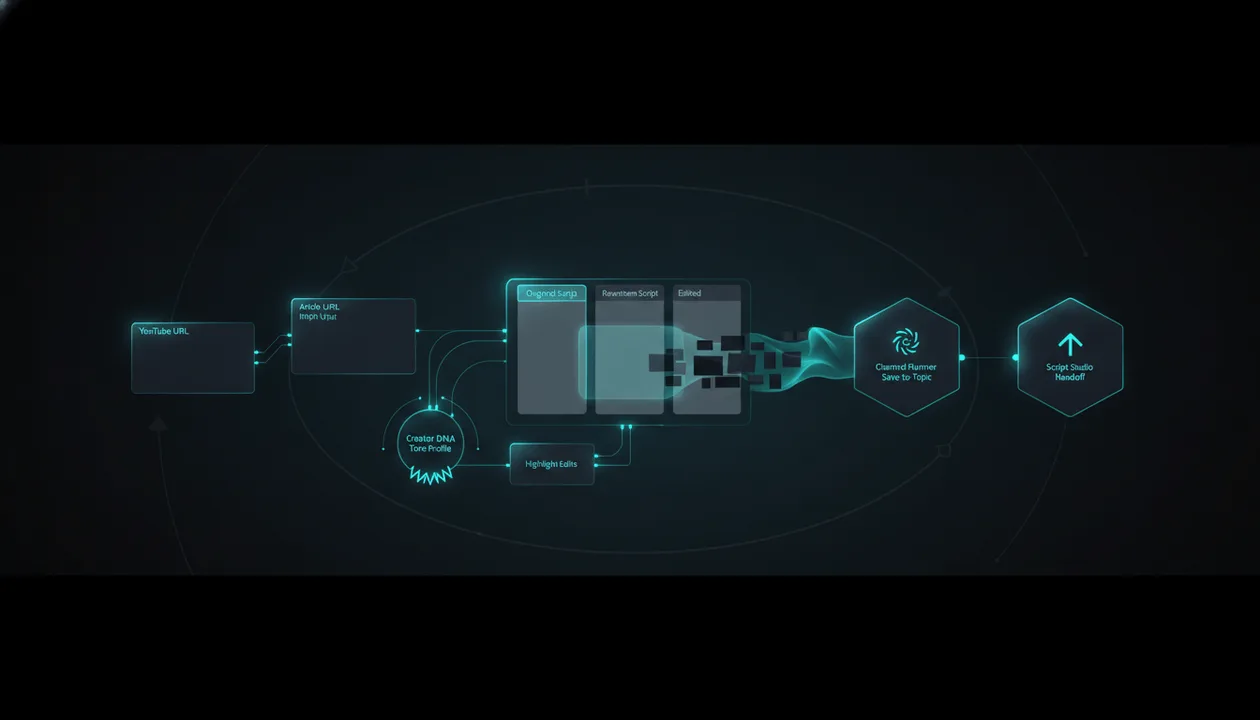
1. OverseerOS Script ReSpark: Best Overall YouTube Script Rewriter for Creators
OverseerOS Script ReSpark is the strongest YouTube script rewriter tool if you want a real creator workflow instead of a simple paraphraser.
It is built for creators who already have source material and want to turn it into something fresh, usable, and aligned with their channel.
Script ReSpark gives you three main entry paths:
| Entry Mode | What It Does |
|---|---|
| Agentic Script Studio | Sends you into Script Studio for full authoring and Writing Agent workflows |
| Rewrite from URL | Paste a YouTube or article URL and rewrite the pulled source into a new script |
| Rewrite from Script | Paste any script and rewrite it into a fresh version |
That makes it useful when you have:
- A competitor video you want to study
- An article you want to turn into a video script
- An old script you want to refresh
- A transcript you want to transform
- A rough draft you want to rewrite
- A script you want to adapt to a different channel tone
Why OverseerOS Is Different
Most rewriters stop at paraphrasing.
OverseerOS Script ReSpark is built for YouTube creators.
That means it connects rewriting to:
- Channel tone
- Creator DNA
- Script editing
- Source comparison
- Planner topics
- Production workflow
- Script Studio handoff
Inside Script ReSpark, you can compare:
- Original
- Rewritten
- Edited
That matters because serious creators need control.
You do not want a black-box rewrite where the tool changes everything and you lose the source logic.
You want to see what changed, refine it, and make it yours.
Creator DNA Rewrites
One of the strongest features is Creator DNA.
If you have a saved Creator DNA profile, Script ReSpark can rewrite the script in that channel tone.
This is a major advantage over basic rewriting tools.
A generic rewriter can make text “engaging.”
But Creator DNA can help the script sound closer to the voice, rhythm, and style of your own channel.
That is especially useful for:
- Faceless channels
- Multi-channel operators
- Creator teams
- Channels with a specific narrator style
- Rewriting source material into a consistent brand voice
The goal is not to copy another creator word for word.
The goal is to make the rewritten script sound native to your channel.
Highlight Edits
Script ReSpark also supports highlight editing.
That means you can select a specific span in the rewritten script and ask AI to modify only that part.
This is important because rewriting is rarely perfect in one pass.
You may want to:
- Make one section more dramatic
- Simplify a confusing paragraph
- Add more stakes
- Make the hook sharper
- Remove generic wording
- Change a transition
- Make a section sound more like your channel
- Fix one sentence without rewriting the whole script
Generic rewrite tools often force you to regenerate everything.
Highlight editing gives you surgical control.
Channel Planner Tie-In
Script ReSpark can also save the rewritten script to a Channel Planner topic.
That turns rewriting from a one-off text action into a production workflow.
This matters because creators do not just need a rewritten script.
They need to know where it goes.
A script tied to a planner topic can stay aligned with the content calendar, voiceover workflow, and broader production system.
When to Use Script Studio Instead
Script ReSpark is for rewriting supplied material.
If you want deeper section-by-section YouTube craft, Script Studio is the better place.
Script Studio is where you can build from:
- Title
- Topic
- Creative brief
- Outline
- Long-form or short-form format
- Creator DNA
- Reference tone
- Non-negotiables
- Section-level AI commands
- Writing Agent
That is where the more advanced YouTube craft lives: hooks, bridges, section flow, target length, retention polish, and script shaping.
The best workflow is often:
Use ReSpark to transform the source
→ refine the rewritten script
→ save to planner or continue in Script Studio
Best For
- YouTube creators rewriting source material
- Faceless channel operators
- Creator teams
- YouTube automation workflows
- Business case study channels
- AI and tech channels
- Education channels
- Psychology and self-improvement channels
- Channels that need a consistent voice
- Creators turning articles or videos into original scripts
Main Strength
OverseerOS Script ReSpark is not just a rewriter.
It is a YouTube-specific rewrite workflow.
It helps creators transform source material, match channel tone, edit surgically, compare versions, and file scripts into a planner.
That is much more useful than “paste script, get paraphrase.”
Main Weakness
Script ReSpark is best when you actually have source material to rewrite.
If you are starting from a blank idea, Script Studio, Trend-to-Script, or the broader OverseerOS workflow is a better starting point.
Verdict
Use OverseerOS Script ReSpark if you want to turn YouTube URLs, article URLs, or pasted scripts into original, channel-matched YouTube scripts.
If you want rewriting that fits a real creator workflow, rewrite YouTube scripts into original content with OverseerOS.
2. vidIQ AI Script Generator: Best for Fast Idea-to-Script Drafts
vidIQ’s AI Script Generator is not mainly a dedicated script rewriter, but it is relevant because it can generate and refine YouTube scripts quickly.
vidIQ says its AI Script Generator can take a video idea or outline and turn it into a full script with intro, talking points, transitions, and call-to-action. It also lets creators adjust tone, pacing, voice, or reshape sections with natural prompts. Source: vidIQ
Best For
- Fast script drafts
- Beginners
- Idea-to-script generation
- Simple YouTube scripts
- Creators already using vidIQ
- SEO-focused creators
Main Strength
vidIQ is quick and easy.
If you have an idea and want a script draft fast, it can help you get past the blank page.
It also connects with other vidIQ tools like title, thumbnail, and description generation.
Main Weakness
vidIQ is stronger as a script generator than a dedicated source-to-original script rewriter.
If your workflow is:
Paste YouTube URL → rewrite source → match Creator DNA → compare original/rewrite/edited → save to planner
OverseerOS Script ReSpark is the stronger fit.
Verdict
Use vidIQ for fast script generation.
Use OverseerOS Script ReSpark when you need to transform existing source material into an original script workflow.
3. Subscribr: Best for Idea-to-Script Workflows With Outlier Data
Subscribr is a YouTube AI script writer and video idea generator.
Its homepage says it helps creators find proven topics from outlier data, write scripts in the creator’s voice with retention hooks, and generate thumbnails from the script idea. Source: Subscribr
That makes it a strong tool in the broader YouTube script category.
Best For
- YouTube script generation
- Outlier-based video ideas
- Channel voice workflows
- Creator teams
- Idea-to-publish workflows
- Script and thumbnail planning
Main Strength
Subscribr is strong because it connects ideas, outliers, voice, scripts, and thumbnails.
That is much better than a generic AI writing tool.
It understands that YouTube scripts should come from proven ideas and channel style.
Main Weakness
Subscribr is not primarily positioned as a YouTube URL/script rewrite tool.
It appears stronger for idea-to-script generation than for rewriting supplied source material with original/rewrite/edited comparison, highlight edits, and planner save-to-topic workflows.
Verdict
Use Subscribr if your main goal is idea-to-script generation using outlier data.
Use OverseerOS Script ReSpark if your main goal is rewriting existing URLs, scripts, or transcripts into original channel-ready scripts.
4. ChatGPT: Best Flexible Script Rewriter if You Prompt It Correctly
ChatGPT can be a powerful YouTube script rewriter.
But it depends entirely on how you use it.
Weak prompt:
Rewrite this YouTube script.
That often creates a surface-level paraphrase.
Better prompt:
Rewrite this YouTube script into a new original script for my channel.

Rules:
- Do not keep the same structure.
- Change the hook completely.
- Keep only the core idea.
- Add new examples.
- Change the section order.
- Use a skeptical but helpful tone.
- Make it sound like a faceless documentary script.
- Avoid copying phrases from the source.
- Create a new ending with a stronger takeaway.
That can produce a much better result.
Best For
- Custom rewriting
- Prompt-driven transformation
- Changing tone
- Creating new outlines
- Expanding drafts
- Turning transcripts into scripts
- Creators who know how to prompt
Main Strength
ChatGPT is flexible.
You can ask it to:
- Rewrite sections
- Create new hooks
- Change tone
- Add examples
- Shorten or expand
- Turn transcripts into outlines
- Create title variants
- Improve pacing
- Make a script more dramatic or simpler
Main Weakness
ChatGPT does not automatically know your channel tone, planner topics, Creator DNA, source comparison workflow, or YouTube-specific rewrite boundaries unless you provide that context manually.
It can also rewrite too closely if your instructions are weak.
Verdict
Use ChatGPT if you are comfortable building your own rewrite workflow.
Use OverseerOS if you want that workflow built for YouTube creators.
5. Claude: Best for Natural Long-Form Script Rewrites
Claude is strong for long-form writing, restructuring, and improving tone.
It is especially useful when a script needs to feel more natural, less mechanical, or more thoughtful.
Best For
- Long-form YouTube scripts
- Documentary scripts
- Educational scripts
- Business case studies
- Script restructuring
- Tone refinement
- Natural rewrites
Main Strength
Claude is good at preserving nuance while improving flow.
That makes it useful for rewriting scripts that feel robotic, cluttered, or too stiff.
It can also help compare different rewrite directions and explain which one feels stronger.
Main Weakness
Claude is still a general-purpose AI assistant.
It does not automatically connect rewrites to YouTube URLs, Creator DNA profiles, Channel Planner topics, or Script Studio workflows unless you build that process manually.
Verdict
Use Claude if you want a strong writing partner.
Use OverseerOS if you want YouTube-specific rewriting, channel tone, planner integration, and script production workflows.
6. Jasper: Best for Brand Voice and Marketing-Style Script Rewrites
Jasper has a YouTube Script Writer and script-related templates. Jasper says its Video Script Hook and Introduction template can create script hooks based on video title and tone of voice. Source: Jasper
Jasper is especially useful for marketers and teams that care about brand voice.
Best For
- Branded YouTube channels
- Marketing videos
- Product videos
- Business content
- Teams already using Jasper
- Hook and intro generation
- Brand voice consistency
Main Strength
Jasper is useful when YouTube scripts are part of a broader marketing content workflow.
If your team already uses Jasper for brand assets, it can help keep content consistent.
Main Weakness
Jasper is not a YouTube-native source-to-script rewrite workflow.
It can help with hooks and script writing, but it is not built around YouTube URL rewrites, Creator DNA, planner topics, or competitor transformation.
Verdict
Use Jasper for branded marketing-style script writing.
Use OverseerOS for YouTube creator rewriting and production workflows.
7. Evernote AI Rewrite: Best General Script Rewriter
Evernote’s AI rewrite tool can rewrite scripts by rephrasing and improving clarity while maintaining the original message. It also offers style options like friendly, formal, funny, and engaging. Source: Evernote
That makes it useful if your need is simple script rewriting.
Best For
- Simple script rewrites
- Tone changes
- Clarity improvements
- General-purpose rephrasing
- Short drafts
- Basic rewriting
Main Strength
Evernote is simple.
If you want to reword a script and change the style, it can help quickly.
Main Weakness
It is not YouTube-specific.
It does not deeply handle:
- title promise
- thumbnail promise
- retention bridges
- channel tone profiles
- URL-to-script workflows
- planner topic saving
- section-level YouTube craft
Verdict
Use Evernote if you want basic rewriting.
Use OverseerOS if you need a YouTube script rewriter built for creator workflows.
8. Kome and Tactiq: Best for Getting YouTube Transcripts Before Rewriting
Kome and Tactiq are transcript tools, not full script rewriters.
But they are useful because many rewrite workflows start with a YouTube transcript.
Kome’s YouTube Transcript Generator lets users paste a YouTube URL, generate a transcript, then copy and use it. Source: Kome
Tactiq’s YouTube Transcript tool lets users paste a YouTube URL, view the transcript, and copy or download it. Tactiq also explains that creators can use YouTube’s built-in “Show transcript” option when available. Source: Tactiq
Best For
- Extracting transcripts
- Research workflows
- Turning videos into text
- Preparing source material for rewriting
- Note-taking
- Manual analysis
Main Strength
Transcript tools solve the first step:
Video → text
That is useful.
Once you have the transcript, you can study the structure, extract key points, or rewrite it into a new script.
Main Weakness
Transcript tools do not transform the script by themselves.
They do not create a new angle, change the structure, match your channel voice, improve retention, or save the result to a planner.
Verdict
Use Kome or Tactiq to extract source text.
Use OverseerOS Script ReSpark to transform source text into an original YouTube script.
9. StudioBinder: Best for Organizing Scripts, Not Rewriting Them
StudioBinder is not an AI script rewriter, but it is useful for production planning.
Its YouTube script writing tool helps creators structure scripts with segments, visual notes, word count, runtime, collaboration, and templates. Source: StudioBinder
That makes it more of a script organization tool.
Best For
- Script formatting
- AV scripts
- Production planning
- Collaboration
- Visual notes
- Timing and runtime
- Organized writing workflows
Main Strength
StudioBinder is strong when your script needs production structure.
If you want to plan dialogue, visuals, timing, and notes, it can help.
Main Weakness
It does not rewrite YouTube scripts with AI.
It does not transform URLs or transcripts into original content.
Verdict
Use StudioBinder for script organization and production planning.
Use a rewrite tool before StudioBinder if the script itself still needs transformation.
10. TubeAnalytics and Other Script Generators: Best for Retention Frameworks
TubeAnalytics has a YouTube script generator article positioning its Viral Script Generator around an 8-section structure optimized for YouTube retention patterns, with tones and hook styles. Source: TubeAnalytics
That makes it relevant for creators who care about structured script generation.
Best For
- Retention-focused script generation
- Hook frameworks
- Structured YouTube scripts
- Analytics-minded creators
- Creators who want script frameworks
Main Strength
A retention framework is useful because YouTube scripts need more than clean writing.
They need structure.
TubeAnalytics’ positioning around hooks, retention, and structured sections is stronger than generic AI writing.
Main Weakness
This is still more script generation than script rewriting.
If you have a YouTube URL, article, or pasted script and want to transform it into a fresh channel-matched version, OverseerOS Script ReSpark is a closer fit.
Verdict
Use TubeAnalytics-style tools for structured script generation.
Use Script ReSpark for rewriting existing source material.
Feature Comparison: Which Script Rewriter Wins?
| Use Case | Best Tool |
|---|---|
| Rewrite from YouTube URL | OverseerOS Script ReSpark |
| Rewrite from article URL | OverseerOS Script ReSpark |
| Rewrite pasted script | OverseerOS Script ReSpark, ChatGPT, Claude, Evernote |
| Match creator/channel tone | OverseerOS Creator DNA, Subscribr |
| Surgical highlight edits | OverseerOS Script ReSpark |
| Original vs rewritten vs edited comparison | OverseerOS Script ReSpark |
| Save script to planner topic | OverseerOS |
| Full section-by-section YouTube craft | OverseerOS Script Studio |
| Fast idea-to-script generation | vidIQ, Subscribr |
| Flexible manual prompting | ChatGPT, Claude |
| General script rephrasing | Evernote |
| YouTube transcript extraction | Kome, Tactiq |
| AV script organization | StudioBinder |
| Retention script frameworks | TubeAnalytics-style tools |
The Better YouTube Script Rewrite Workflow
Do not rewrite like this:
Copy transcript
Paste into AI
Ask it to rewrite
Publish
That is the weak version.
Use this workflow instead.
Step 1: Identify the Source
Your source can be:
- A YouTube video
- A transcript
- An article
- Your own old script
- A rough draft
- A research document
- A competitor’s video structure
Do not treat the source as something to copy.
Treat it as raw material.
Step 2: Extract the Core Idea
Ask:
- What is the main point?
- What is the audience pain?
- What is the promise?
- What is the strongest insight?
- What is the hidden angle?
- What is worth keeping?
- What should be removed?
This prevents you from carrying over the whole source structure.
Step 3: Create a New Angle
The new angle is what makes your video original.
Example source:
How to Start a Faceless YouTube Channel
Weak rewrite:
How to Begin a Faceless YouTube Channel
Strong new angles:
Why Most Faceless YouTube Channels Fail Before 1,000 Subscribers
15 High-Income Faceless YouTube Niches I’d Actually Consider in 2026
I Studied 50 Faceless Channels. The Winners Had 5 Patterns.
Same general world.
Different video.
Step 4: Change the Structure
Do not keep the same section order.
A new structure might use:
- problem → mistake → better workflow
- story → failure → lesson
- list → ranking → final verdict
- myth → truth → example
- teardown → pattern → template
- experiment → result → lesson
This is where real transformation happens.
Step 5: Match the Channel Voice
This is where Creator DNA matters.
A script should sound like it belongs on your channel.
A business case study channel, psychology channel, AI tools channel, and faceless documentary channel should not sound the same.
Tone changes everything.
Step 6: Rewrite Section by Section
Do not rewrite the whole script blindly.
Work section by section.
For each section, ask:
- What should this section accomplish?
- Does it create curiosity?
- Does it add new value?
- Does it move the viewer forward?
- Does it sound like my channel?
- Is it too close to the source?
This is also where highlight edits are useful.
Step 7: Move Into Production
A rewritten script should not sit in a random document.
It should move into:
- Channel Planner
- voiceover workflow
- editing brief
- thumbnail concept
- title testing
- production notes
This is why saving to a planner topic inside OverseerOS matters.
It turns the rewrite into a real video asset.
Script Rewrite Template
Use this before rewriting any source.
| Field | Notes |
|---|---|
| Source URL or script | |
| Original topic | |
| Original audience | |
| Core idea worth keeping | |
| What must change | |
| New audience angle | |
| New title direction | |
| New thumbnail promise | |
| New structure | |
| Channel tone / Creator DNA | |
| Must-include points | |
| Must-avoid points | |
| New examples to add | |
| Sections to remove | |
| Sections to expand | |
| Final script destination |
Example:
| Field | Example |
|---|---|
| Original topic | Best AI tools for YouTube |
| Core idea | Creators need tools that actually save time |
| What must change | Avoid generic tool list |
| New angle | I tested tools and filtered the few worth using |
| New title direction | I Tested 12 AI Tools for YouTube. Only 4 Were Useful. |
| Thumbnail promise | 12 tools shown, 4 highlighted winners |
| New structure | test setup → failures → useful tools → final stack |
| Channel tone | skeptical but helpful |
| Must-avoid | fake results, hype, copied phrasing |
| New examples | real creator workflow examples |
| Destination | save to Channel Planner topic |
This is how a rewrite becomes an original video concept.
Common Mistakes With YouTube Script Rewriters
Mistake 1: Paraphrasing Too Closely
Changing words is not enough.
If the structure, examples, hook, title, and conclusion are basically the same, the rewrite is weak.
Make the source unrecognizable in structure, not just wording.
Mistake 2: Keeping the Same Hook
The hook is one of the most identifiable parts of a script.
Do not reuse the source hook.
Write a new hook based on your angle.
Weak:
In today’s video, we’ll talk about the best AI tools for YouTube.
Better:
I tested 12 AI tools that promise to help YouTube creators. Most of them created the same generic output. But four actually changed the workflow.
Mistake 3: Copying the Title and Thumbnail
A rewritten script with the same title and thumbnail idea still feels copied.
Change the packaging.
A new script needs a new promise.
Mistake 4: Not Adding New Value
A rewrite should add something.
That could be:
- new examples
- new structure
- new perspective
- better explanation
- updated information
- stronger story
- clearer framework
- more useful template
- different audience focus
If you add nothing, you are not rewriting. You are recycling.
Mistake 5: Ignoring Channel Tone
A script can be original but still wrong for your channel.
If your channel has a specific tone, use it.
This is where Creator DNA-style rewriting is valuable.
Mistake 6: Treating Transcript Tools Like Rewriters
A transcript tool gives you text.
It does not create originality.
Use transcript tools for extraction.
Use a real script workflow for transformation.
Mistake 7: Skipping the Production Workflow
A rewritten script is only useful if it moves toward production.
Tie it to:
- topic
- title
- thumbnail
- voiceover
- editor brief
- planner
- publish date
That is how creators turn rewriting into output.
How OverseerOS Script ReSpark Fits Into the Full Script System
Script ReSpark is one door inside the bigger OverseerOS script workflow.
Here is how the pieces fit.
| Need | Best OverseerOS Workflow |
|---|---|
| Rewrite a YouTube URL | Script ReSpark |
| Rewrite an article URL | Script ReSpark |
| Rewrite pasted script | Script ReSpark |
| Match Creator DNA tone | Script ReSpark or Script Studio |
| Edit one selected span | ReSpark highlight edits or Script Studio highlight edits |
| Build a script from scratch | Script Studio |
| Use an agentic section-by-section writer | Script Studio Writing Agent |
| Turn trend research into an outline | Trend-to-Script |
| Save script to production topic | Channel Planner save workflow |
This matters because rewriting is only one part of script creation.
If your source material is already strong, ReSpark can transform it.
If you need deeper YouTube craft, Script Studio is where the long-form structure, bridges, hooks, section flow, target length, and Writing Agent live.
That gives creators flexibility.
You can rewrite, refine, and then keep building.
Best Overall YouTube Script Rewriter Tool
If you want basic paraphrasing, Evernote or a generic AI rewriter can help.
If you want transcript extraction, use Kome or Tactiq.
If you want fast script generation from an idea, vidIQ can help.
If you want outlier-based idea-to-script workflows, Subscribr is relevant.
If you want flexible manual rewriting, use ChatGPT or Claude.
But if you want the best YouTube script rewriter for creators, use OverseerOS Script ReSpark.
The reason is simple:
OverseerOS is built for the actual creator workflow.
It lets you start from a URL or pasted script, rewrite the source, optionally match Creator DNA, compare original and rewritten versions, edit specific sections, and save the result to a planner topic.
That is what makes it stronger than a generic script rewriter.
It does not just rewrite words.
It helps move source material into an original YouTube production workflow.
Final Verdict
The best YouTube script rewriter tool in 2026 is not the one that changes the most words.
It is the one that helps you create a script that feels meaningfully original, fits your channel voice, and can actually become a video.
Generic script rewriters are fine for small wording changes.
But creators need more.
They need angle transformation, structure changes, channel tone, surgical edits, planner workflows, and a clear line between inspiration and copying.
That is why OverseerOS Script ReSpark is the strongest option for serious YouTube creators.
It helps turn YouTube URLs, article URLs, and pasted scripts into fresh, channel-matched scripts while keeping the rewrite inside a real content workflow.
If you want to transform source material into original YouTube scripts, rewrite YouTube scripts into original content with OverseerOS and build from patterns without becoming a copy.
FAQ
What is the best YouTube script rewriter tool in 2026?
The best YouTube script rewriter tool depends on your workflow. OverseerOS Script ReSpark is best for creators who want to rewrite YouTube URLs, article URLs, or pasted scripts into fresh scripts with optional Creator DNA tone, highlight edits, version comparison, and Channel Planner save-to-topic workflows.
Can AI rewrite a YouTube script?
Yes. AI can rewrite a YouTube script, but the quality depends on how much transformation happens. A good rewrite should change the angle, structure, hook, examples, tone, and final takeaway. It should not simply paraphrase the original.
Is it okay to rewrite competitor YouTube scripts?
You can study competitor scripts for inspiration, but you should not copy them. A responsible rewrite should create meaningful differences: new structure, new wording, new examples, new title, new thumbnail concept, and your own channel voice.
What is the difference between a YouTube script rewriter and a YouTube script generator?
A script rewriter starts from existing source material, such as a URL, transcript, article, or pasted script. A script generator starts from an idea, title, or outline and creates a script from scratch. OverseerOS has both workflows through Script ReSpark and Script Studio.
Can I turn a YouTube transcript into a new script?
Yes. You can extract a transcript with tools like Kome or Tactiq, then rewrite it into a new script. But do not only paraphrase the transcript. Use it as source material, then change the angle, structure, examples, and tone.
What is Script ReSpark in OverseerOS?
Script ReSpark is an OverseerOS workflow for rewriting existing content. You can start from a YouTube URL, article URL, or pasted script, rewrite it into a fresh version, optionally use Creator DNA tone, compare original vs rewritten vs edited versions, make highlight edits, and save the script to a Channel Planner topic.
What is Creator DNA in script rewriting?
Creator DNA is a saved tone profile that helps the rewritten script match a specific channel style. In OverseerOS, Creator DNA can help rewrite supplied source material so the output sounds closer to your channel instead of generic AI writing.
What is the safest way to rewrite a YouTube script?
The safest way is to use the source as research, not as a template to copy. Change the hook, structure, examples, title, thumbnail concept, tone, and ending. Add your own insight and make sure the final video feels meaningfully different.
Are transcript tools the same as script rewriters?
No. Transcript tools turn videos into text. They do not automatically rewrite the content, improve the structure, match your channel tone, or make the script original. They are useful at the extraction stage, not the full rewrite stage.
Should I use Script ReSpark or Script Studio?
Use Script ReSpark when you have source material to rewrite, such as a URL, article, transcript, or pasted script. Use Script Studio when you want to build a new script from an idea, title, outline, Creator DNA profile, or trend handoff with deeper section-by-section YouTube craft.